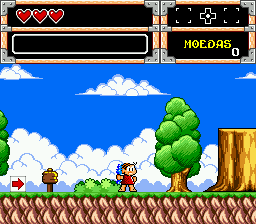
Turma da Monica na Terra dos Monstros (Brazil)
Turma da Monica na Terra dos Monstros (Brazil): Genesis Platformer
Turma da Monica na Terra dos Monstros is a Brazilian exclusive title for the SEGA Genesis, released during the early 1990s. It was developed and published by Tec Toy, the official Sega licensee for Brazil, who localized and created original games featuring the popular Monica's Gang comic characters. This is an official, fully licensed release, not a hack or prototype. The game is a side-scrolling platformer that puts Monica and her friends in a monster-filled world.
How to Play Turma da Monica na Terra dos Monstros (Brazil) Online
Getting started: When you start the game, you'll see a title screen with Monica and friends. Press Start to begin. The game is a traditional side-scrolling platformer. You control one of the characters, moving left or right, jumping over pits and obstacles, and attacking monsters. The core loop involves progressing through levels, collecting items like fruits or coins, and defeating enemies to reach the end-of-level goal.
As you play, you'll encounter different types of enemies and hazards. Some may require timing your jumps or using special attacks. The controls are straightforward: jump with the X key and attack with the S key. If you get hit, you lose a life, and you have a limited number of lives. The game ends when you run out of lives, but you can continue from the last checkpoint by pressing Start on the game over screen. There is no save feature, so it's a classic arcade-style experience.
Since this is a Brazilian release, the menus and text are in Portuguese, but they are simple and easy to navigate. The main menu offers options like "Jogar" (Play) and "Opções" (Options). If you don't speak Portuguese, just press Start to begin and experiment with the controls. The game is family-friendly and relatively easy to pick up, making it a good choice for casual play.
Turma da Monica na Terra dos Monstros (Brazil) Keyboard Controls
Controls
- Arrow Keys: D-Pad / Movement
- X: A button
- S: B button
- Z: C button
- A: X button (6-button pad)
- Q: Y button (6-button pad)
- E: Z button (6-button pad)
- Enter: Start / Mode





Comments (0)