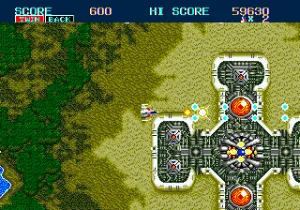
Thunder Force II MD (Japan)
Thunder Force II MD (Japan) on Genesis
Thunder Force II MD is the Japanese Mega Drive version of Technosoft's classic shooter, originally released in 1989 in Japan. Developed and published by Technosoft, this game is a direct port of their 1988 X68000 title, known for its fast-paced action and technical polish. It's a shoot-'em-up that helped define the genre on Sega's 16-bit hardware, offering a mix of top-down and side-scrolling stages that set it apart from contemporaneous arcade ports.
How to Play Thunder Force II MD (Japan) Online
Getting Started
After the title screen, press Start to enter the configuration menu. Use Arrow Keys to navigate and X to confirm selections. The menu is in Japanese but options are limited to stage select, difficulty, and sound test. Choose a stage and press Start to begin play.
The core loop alternates between vertical scrolling stages (top-down perspective) and horizontal scrolling stages (side-view). Your ship automatically fires when you hold the fire button (X). Collect power-ups by shooting carriers to upgrade your main weapon and gain the iconic "Claw" option that orbits your ship and fires independently. Each stage ends with a boss encounter that requires pattern recognition to defeat.
New players should start on easy difficulty to learn the stage layouts and boss patterns. The weapon upgrades persist through stages, so it's important to survive and collect as many as possible. Smart bombs are limited, so use them sparingly. Memorizing enemy spawn points and power-up locations is key to overcoming the game's high difficulty.
Thunder Force II MD (Japan) Keyboard Controls
Controls
- Arrow Keys: D-Pad / Movement
- X: A button
- S: B button
- Z: C button
- A: X button (6-button pad)
- Q: Y button (6-button pad)
- E: Z button (6-button pad)
- Enter: Start / Mode
Comments (0)