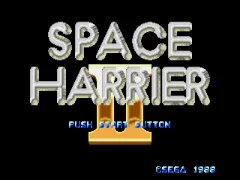
Space Harrier II (Japan) (Launch Cart)
Space Harrier II (Japan) (Launch Cart) on Genesis
Space Harrier II arrived on the SEGA Genesis as a launch title in Japan back in 1989. Published and developed by Sega, this cartridge was one of the few games available when the console first hit shelves. It's a direct follow-up to the iconic arcade shooter Space Harrier, but built specifically for the 16-bit home system rather than being a straight port of a newer arcade board.
How to Play Space Harrier II (Japan) (Launch Cart) Online
Getting Started
Press Start to begin. The game immediately throws you into the action: you control a flying character that moves in eight directions across a pseudo-3D landscape. Your goal is to shoot down waves of enemies while dodging their attacks and obstacles that rush toward you. The camera stays behind you, giving that classic Space Harrier sense of speed.
The core loop is simple: move left or right to avoid fire, hold the B button to shoot continuously, and release A to jump. Jumping lets you avoid ground-level hazards and also acts as your main evasive move. There is no health bar; touch an enemy or projectile and you lose a life. The game scrolls forward automatically, pushing you through each stage until you face a boss at the end.
Since this is the Japanese launch cartridge, all menus and text are in Japanese. The title screen and options are minimal; just press Start to jump straight into the game. If you are unfamiliar with the language, the only thing you really need to know is that the first option on the main menu starts the game. The lack of an English translation is not a big barrier because the gameplay is entirely action-based.
Space Harrier II (Japan) (Launch Cart) Keyboard Controls
Controls
- Arrow Keys: D-Pad / Movement
- X: A button
- S: B button
- Z: C button
- A: X button (6-button pad)
- Q: Y button (6-button pad)
- E: Z button (6-button pad)
- Enter: Start / Mode
Comments (0)