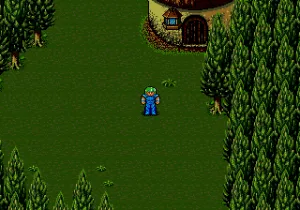
Sorcer Kingdom (Japan)
Sorcer Kingdom (Japan) - RPG Classic
Sorcer Kingdom is a Japanese-exclusive role-playing game for the SEGA Genesis, released during the early 1990s. While the exact developer and publisher are not widely documented, it belongs to the wave of fantasy-themed RPGs that appeared on the platform after the success of games like Phantasy Star. This title never saw an official release outside of Japan, so playing it on emulators is one of the few ways to experience it today.
The player controls a party of adventurers exploring a medieval fantasy world. The gameplay revolves around navigating towns and dungeons via an overhead map, engaging in turn-based battles against monsters, and managing equipment and spells. Japanese text fills the menus and dialogue, so some familiarity with the language or a translation guide is helpful for understanding story elements and item names.
For retro RPG fans, Sorcer Kingdom offers a glimpse into the lesser-known side of the Genesis library. Its straightforward combat and exploration are typical of early 16‑bit Japanese role-playing games, and while it is not a landmark title, it holds appeal for collectors and those curious about niche imports. The game is simple compared to later epics, but its scarcity and regional exclusivity make it a curious piece of gaming history.
How to Play Sorcer Kingdom (Japan) Online
Getting Started
When the game boots, you are greeted with a Japanese title screen. Press Start to move past it and reach the main menu. From here, you can start a new game or, if available, continue from a saved state. Because the menus are entirely in Japanese, you may need to experiment or consult a guide to navigate the options.
Once in the game, you control a character moving across a world map. Entering a town triggers conversations with NPCs (text only) and shops for buying equipment. Encounters happen randomly as you walk on the world map or in dungeons, leading to turn-based battles. Use the D‑Pad to select commands from the menu, X to confirm, and S to cancel. The core loop is typical of early JRPGs: explore, fight, level up, and progress the story by visiting key locations.
A few practical tips: save often via the emulator's save state feature since the game's own saving method may be unclear. If you get stuck, consider looking for a translation guide online. The game is not especially hard, but the language barrier adds a layer of difficulty for non‑Japanese speakers.
Sorcer Kingdom (Japan) Keyboard Controls
Controls
- Arrow Keys: D-Pad / Movement
- X: A button
- S: B button
- Z: C button
- A: X button (6-button pad)
- Q: Y button (6-button pad)
- E: Z button (6-button pad)
- Enter: Start / Mode
Comments (0)