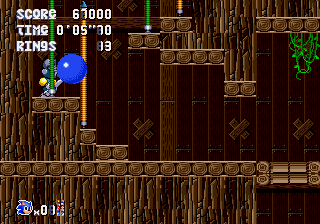
Sonic Maxidrive (2023 Demo)
Sonic Maxidrive (2023 Demo) Overview
Sonic Maxidrive is a fan-made demo created for the SEGA Genesis that reimagines the classic Sonic formula. Released in 2023 as a free homebrew demo, it was developed by an independent enthusiast known only as 'Maxidrive' (or a small team) and is available online for emulation or real hardware. This is not an official Sega release; instead, it's a passion project that speeds up Sonic's gameplay with a focus on momentum and high-speed platforming.
In this demo, you control Sonic as he runs, jumps, and spin-dashes through a set of custom-designed levels. The core loop involves collecting rings, avoiding enemies, and reaching the goal while maintaining speed. The physics have been tuned to feel heavier and more accelerative than the original games, rewarding players who learn to carry momentum through loops and slopes. The demo includes a handful of zones, each with a distinct visual style that borrows from the Genesis palette but features original level geometry.
What makes Sonic Maxidrive worth trying is its commitment to the high-speed platforming ethos of the early 90s, while offering a fresh level layout and physics tweak that veterans might appreciate. It's a short, earnest demo that doesn't overstay its welcome, and it serves as a best example of how the Sonic engine can be pushed in new directions by the modding community. If you enjoy classic 16-bit platformers or are curious about fan-made Genesis games, this is a neat, bite-sized experience to check out.
How to Play Sonic Maxidrive (2023 Demo) Online
Getting Started
When you boot up Sonic Maxidrive, you'll be greeted with a title screen that likely prompts you to press Enter (Start) to begin. The demo includes a short intro or a menu where you can select a level if multiple zones are available. Start with the first stage to get a feel for the modified physics - Sonic accelerates faster but also has slightly more inertia, so you'll need to anticipate turns and jumps earlier than in the original games.
The core gameplay loop is straightforward: run to the right, collect rings (to survive hits), and race to the end of the zone. You can spin-dash by pressing down and then the A button (X on keyboard) to charge up. The demo's level design encourages you to find alternate paths and hidden items. There are no special stages in this demo, so focus on reaching the goal quickly. If you lose all rings and get hit, you'll lose a life - but continue on the spot. The demo ends after a few zones, so treat it like a sneak peek of a larger project.
Pay attention to the HUD at the top of the screen: rings count, score, and lives. The control remapping is standard for emulated Genesis games, so if you're used to playing Sonic on keyboard, the A and B buttons for jump and run will feel natural. If you get stuck, try exploring each level for alternate routes or time your jumps on moving platforms. This is a fast game, and the demo is short enough to replay and improve your times.
Sonic Maxidrive (2023 Demo) Keyboard Controls
Controls
- Arrow Keys: D-Pad / Movement
- X: A button
- S: B button
- Z: C button
- A: X button (6-button pad)
- Q: Y button (6-button pad)
- E: Z button (6-button pad)
- Enter: Start / Mode






Comments (0)