CHOOSE A VERSION
2 versions · same consoleChoose an original release, regional version, revision, bootleg or clearly labelled ROM hack/mod, then press Play. Hacks may change the gameplay. Switching versions restarts the player.
Selected: Default · USA · USA
The game loads when you press Play · press “Play Now” inside the game if it asks.
Socket (USA)
Socket
About Socket
- SEGA Genesis
- Platformer
- 5· 0 votes
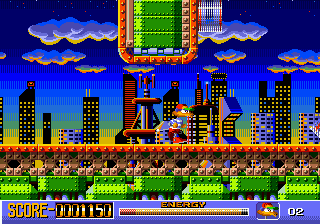
Socket is a 1994 platformer for the Sega Genesis that put the spotlight on a robotic duck named Socket. Published by Vic Tokai, it arrived during the twilight years of the 16-bit era when mascot-driven action games were still a staple. The game is a straightforward side-scroller that doesn't reinvent the wheel but knows exactly what it wants to be.
You guide Socket through a series of colorful levels, collecting glowing lightning bolts that serve as his energy source. These bolts are scattered across the stages, and you need to keep Socket's power meter from draining completely. Enemies and obstacles block your path, and you'll need to jump, duck, and sometimes attack to survive. The core loop is simple: move right, grab bolts, avoid danger, and reach the level exit.
Socket is a solid if unremarkable entry in the Genesis library. Its visuals are bright and the controls are responsive, though the challenge can spike toward the end. If you grew up on 16-bit platformers and appreciate a quirky lead character, it's worth a short playthrough. Just know that it's a shorter, simpler game compared to the heavy hitters of the era.
GAME INFO
- Platform
- SEGA Genesis
- Genre
- Platformer
- Publisher
- Tokai Communications
- Developer
- Tokai Communications
- Released
- 1994
- Players
- 1
- Region
- USA
How to play Socket online
To start playing Socket, press Enter to get past the title screen. You control Socket as he runs through each level from left to right. The primary objective is to collect as many lightning bolts as possible because they power Socket's energy bar. If that bar empties, you lose a life.
Enemies can be dealt with by jumping on them or using the B button to attack. Keep an eye on your energy and don't linger too long in one area. The game is fairly linear, so just keep moving forward, collect bolts, and find the exit at the end of each stage. There are no complex menus or inventory systems, so you can jump right into the action.
CONTROLS
Controls
- Arrow Keys: D-Pad / Movement
- X: A button
- S: B button
- Z: C button
- A: X button (6-button pad)
- Q: Y button (6-button pad)
- E: Z button (6-button pad)
- Enter: Start / Mode
Socket FAQ
Who developed Socket?
The game was developed by Vic Tokai, a Japanese studio that released several titles for the Genesis. The specific team members behind Socket are not widely documented.
Roughly how long does it take to finish Socket?
A skilled player can finish Socket in about 30 to 45 minutes. It is a short game, but limited continues and later levels add some difficulty.
Does Socket have a multiplayer or co-op mode?
Socket is strictly a single-player game. There is no cooperative or competitive multiplayer mode included.
You may also like
All SEGA Genesis games











GAME INFO
- Platform
- SEGA Genesis
- Genre
- Platformer
- Publisher
- Tokai Communications
- Developer
- Tokai Communications
- Released
- 1994
- Players
- 1
- Region
- USA
COMMENTS (0)
No comments yet. Be the first to share your thoughts.