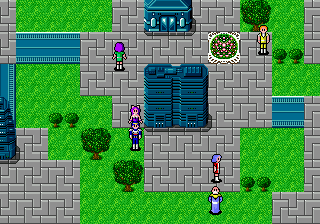
Phantasy Star II - Kaerazaru Toki no Owari ni (Japan)
Getting to Know Phantasy Star II - Kaerazaru Toki no Owari ni (Japan)
Phantasy Star II: Kaerazaru Toki no Owari ni is the Japanese release of Sega's landmark sci-fi RPG, originally hitting the Mega Drive in 1989. Developed and published by Sega, it's the second entry in the Phantasy Star series and a direct sequel to the Master System original. This version features the full Japanese text and subtitle, making it distinct from the later English localization that trimmed some elements.
The game is a turn-based RPG where you control a party of adventurers exploring a dystopian future. You traverse a mix of overworld maps, towns, and sprawling dungeons, engaging in random encounters with enemies. Battles are menu-driven, letting you attack, cast spells, use items, or flee. The core loop involves managing resources, leveling up, solving environmental puzzles, and advancing a story centered on a corrupt computer system. The interface is entirely in Japanese, so menu navigation relies on recognizing item icons and common RPG patterns rather than reading kanji.
As one of the first 16-bit RPGs, this original Japanese version offers a pure, unlocalized glimpse into Sega's classic design. The game is known for its challenging difficulty, memorable boss fights, and a soundtrack that still holds up. For retro enthusiasts and collectors, it's a piece of RPG history that shows how the genre evolved on the Genesis before Western audiences got their hands on it. Just be ready for a grind and a Japanese-only menu system if you pick it up.
How to Play Phantasy Star II - Kaerazaru Toki no Owari ni (Japan) Online
Getting started: Upon starting a new game, you'll be shown a brief story intro in Japanese. After that, you control the main character in the town of Parma. Walk around and talk to NPCs (press X to confirm when standing near them) to learn about your mission. The core loop is exploring towns for clues and items, then heading into dungeons to fight monsters and progress the plot.
Because the game is entirely in Japanese, expect some trial and error. Menus show options like battle commands (attack, magic, item, run) with kanji; you can learn their positions by experimenting in the first few fights. Save your progress at terminals found in towns (they look like computer consoles). Use the D-Pad to navigate the overworld and dungeons, and press S to cancel out of menus or run from a battle. The 'Start' button opens the main menu where you can check stats, equip items, and save.
Phantasy Star II - Kaerazaru Toki no Owari ni (Japan) Keyboard Controls
Controls
- Arrow Keys: D-Pad / Movement
- X: A button
- S: B button
- Z: C button
- A: X button (6-button pad)
- Q: Y button (6-button pad)
- E: Z button (6-button pad)
- Enter: Start / Mode
Comments (0)