The game loads when you press Play · press “Play Now” inside the game if it asks.
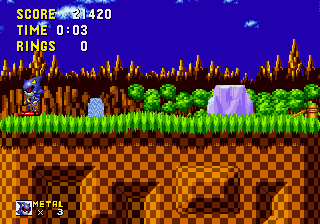
Metal Sonic in Sonic the Hedgehog
Metal Sonic in Sonic the Hedgehog
Metal Sonic in Sonic the Hedgehog: Genesis Platformer
- SEGA Genesis
- Platformer
- ROM Hack
- 5· 0 votes
Unofficial ROM hack. The notes below come from community sources and have not been verified against the patch itself, so levels, mechanics and features may differ from what is described.
GAME INFO
- Platform
- SEGA Genesis
- Genre
- Platformer
- Players
- 1
- Based on
- Sonic the Hedgehog
More Sonic the Hedgehog Games
Ready for another round? Explore more Sonic the Hedgehog games and console editions. Choose a game below to play it on its own page.






How to play Metal Sonic in Sonic the Hedgehog online
Getting Started
When you start the game, you'll see the title screen showing "Metal Sonic in Sonic the Hedgehog." Press Enter to begin a new game. You take control of Metal Sonic in Green Hill Zone, the first level of the original Sonic the Hedgehog. The objective is straightforward: reach the end of each act within the ten-minute time limit while collecting rings and defeating Dr. Robotnik's badniks.
The core loop is running and jumping. Hold the D-Pad right to move forward, press X to jump, and tap S while jumping to perform a Spin Attack that can destroy enemies or break through obstacles. Rings serve as health; if you get hit while carrying at least one ring, they scatter and you lose them, but you survive. Collect 50 rings to access the Special Stage at the end of each act, which gives extra lives. The game ends if you run out of lives - you have three to start.
This hack does not change the level geometry or enemy placement, so any strategy that works in the original Sonic works here. There are no in-game instructions, but the controls are identical. If you've played any classic Sonic title, you'll feel right at home controlling Metal Sonic.
CONTROLS
Controls
- Arrow Keys: D-Pad / Movement
- X: A button
- S: B button
- Z: C button
- A: X button (6-button pad)
- Q: Y button (6-button pad)
- E: Z button (6-button pad)
- Enter: Start / Mode
Metal Sonic in Sonic the Hedgehog FAQ
What makes Metal Sonic in Sonic the Hedgehog stand out among SEGA Genesis titles of its era?
As a ROM hack, it stands out by letting players control Metal Sonic in the original Sonic the Hedgehog - something not possible in any official release. The novelty of playing as a fan-favorite villain through the classic Green Hill Zone appeals to retro enthusiasts who want a fresh twist on familiar gameplay.
In what year was Metal Sonic in Sonic the Hedgehog originally released?
The exact release year for this hack is not widely documented, as it was created by the community after the original 1991 game. Most online sources do not provide a confirmed date, so the year remains uncertain.
Does Metal Sonic in Sonic the Hedgehog have a multiplayer or co-op mode?
No, this hack is a single-player experience only. It modifies the original Sonic the Hedgehog, which had no multiplayer mode, and no cooperative or versus options have been added.
You may also like
All SEGA Genesis games











GAME INFO
- Platform
- SEGA Genesis
- Genre
- Platformer
- Players
- 1
- Based on
- Sonic the Hedgehog
COMMENTS (0)
No comments yet. Be the first to share your thoughts.