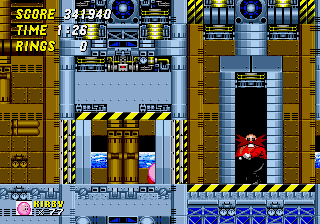
Kirby in Sonic the Hedgehog 2
Kirby in Sonic the Hedgehog 2 Overview
Kirby in Sonic the Hedgehog 2 is a fan-made ROM hack of the classic SEGA Genesis game Sonic the Hedgehog 2. It swaps out Sonic for Kirby, borrowing his round pink look and some of his abilities from the Kirby series. While the exact creator and release date aren't widely documented, this hack was built for the Genesis and likely surfaced in online retro communities during the 2000s. It's a platformer at heart, just with a different lead character.
You guide Kirby through the same zones as Sonic 2, like Emerald Hill Zone and Chemical Plant Zone. The core loop remains unchanged: run from left to right, jump on platforms, collect rings, and defeat badniks. The big twist is that Kirby can float using his trademark puffball ability, which changes how you tackle certain sections. Some versions of this hack may also let him inhale enemies, but I'd need to double-check that specific detail. Basically, you're playing Sonic 2 levels with Kirby's physics.
This hack is more of a novelty than a polished game, but that's part of its charm for retro fans. If you've played Sonic 2 a hundred times, swapping in Kirby gives the familiar stages a fresh feel. It's not as tightly balanced as the original, and some jumps may feel awkward with Kirby's floatier movement. Still, it's a fun way to see two iconic franchises mashed together on a 16-bit console. Just don't expect a full rework of the game's structure.
How to Play Kirby in Sonic the Hedgehog 2 Online
Getting Started
When you first load up Kirby in Sonic the Hedgehog 2, you'll see the title screen. Press Start to begin. The game behaves almost identically to the original Sonic 2: you control a character (now Kirby) through side-scrolling levels, avoiding obstacles and badniks. The goal in each zone is to reach the end and collect the Chaos Emeralds in special stages if you want the best ending.
Kirby's float ability is the main difference from Sonic. Hold the jump button (X) after leaping to hover for a short time. This can help you cross gaps or avoid enemies, but it slows you down, so use it wisely. You can still spin attack by holding down and pressing jump, just like Sonic's spin dash. Rings are your life: collect 100 for an extra life, but if you get hit, you'll lose them all. Gather at least one ring after being hit to avoid losing a life.
The core loop is simple: run fast, jump on enemies, avoid pitfalls, and reach the act's end signpost. If you lose all lives, you'll get a continue. The hack doesn't change the level layouts, so your old Sonic 2 knowledge will serve you well. There are no new level-specific mechanics, so just play it like a slower, floatier Sonic 2.
Kirby in Sonic the Hedgehog 2 Keyboard Controls
Controls
- Arrow Keys: D-Pad / Movement
- X: A button
- S: B button
- Z: C button
- A: X button (6-button pad)
- Q: Y button (6-button pad)
- E: Z button (6-button pad)
- Enter: Start / Mode





Comments (0)