Hellfire (Europe)
Hellfire (Europe): Genesis Shooter
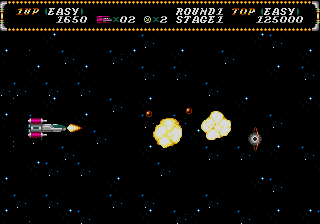
Hellfire is a horizontally scrolling shooter that originally hit Japanese arcades in 1989, developed by Toaplan and published by Taito. The SEGA Genesis version you can play here is the European release, bringing that fast-paced arcade action to home consoles. As one of Toaplan's earliest horizontal shoot 'em ups, it set a template for later classics in the genre.
The year is 2998, and a space matter called Black Nebula, controlled by the robot dictator Super Mech, threatens to engulf human galaxies. You take on the role of Captain Lancer of the Space Federation, piloting the CNCS1 spacecraft. Your goal is to fight through enemy forces using your ship's forward and rear guns, collecting power-ups to boost your firepower. The horizontal scrolling keeps you moving right, facing waves of enemies and obstacles.
For retro shooter fans, Hellfire offers a solid challenge with its fast pacing and unique weapon system. It's a bit lesser-known compared to Toaplan's vertical shooters like Twin Cobra, but it holds its own as a demanding arcade conversion. If you enjoy old-school shoot 'em ups or want to explore Toaplan's library, this European Genesis port is worth a look. Just be ready for some tough action.
How to Play Hellfire (Europe) Online
Start the game by pressing Enter. You control the CNCS1 spaceship using the Arrow Keys to move in all directions. Your ship shoots automatically or with the S button - in Hellfire, pressing S fires your primary weapon while holding the direction keys lets you aim the rear gun. The core loop is simple: scroll right, destroy every enemy and boss in your path, and collect power-ups (often dropped by certain enemies) to upgrade your shot. Watch your health bar - you can take multiple hits, but losing all lives means game over. There are no continues in the standard mode, so one credit gives you a single run. Learn enemy patterns and memorize stage layouts to survive.
Hellfire (Europe) Keyboard Controls
Controls
- Arrow Keys: D-Pad / Movement
- X: A button
- S: B button
- Z: C button
- A: X button (6-button pad)
- Q: Y button (6-button pad)
- E: Z button (6-button pad)
- Enter: Start / Mode

Comments (0)