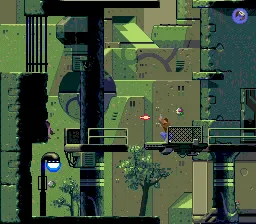
Flashback (Japan)
Getting to Know Flashback (Japan)
You guide Conrad through a series of interconnected, open-ended levels. He can run, jump, climb ledges, and use a holographic disguise device to blend in. Combat is deliberate and sparse; you carry a pistol with limited ammo and a force field that protects you for a few seconds. The core loop involves exploring each area, talking to NPCs (text is in Japanese here), finding key items, and figuring out how to progress. Death is frequent, and you have unlimited continues, so trial and error is part of the experience.
This Japanese version is the same game as the Western release, but all on‑screen text and menus are in Japanese. For English‑speaking players, it's still perfectly playable once you memorise the menu options. Flashback remains a standout because of its movie‑like pacing, mature sci‑fi plot, and silky animation. It's a essential piece of 16‑bit history that holds up well if you enjoy deliberate, thinking‑person's platformers.
How to Play Flashback (Japan) Online
Getting Started
When you first boot up Flashback, you'll see a Japanese title screen. Press Start to reach the menu with options like ニューゲーム (New Game), ロード (Load), and コンフィグ (Config). Choose the first option to begin. A short cinematic introduces Conrad lost in a jungle on Titan. From there you simply move right.
This is a slow‑paced adventure, so do not treat it like a regular platformer. You need to explore each screen carefully. Talk to the computer terminal at the very beginning - it tells you the controls (in Japanese, but a quick button test will reveal them). Your goal is to find a teleport pod and later a ship off the planet. Along the way you pick up your gun, a force field, and a disguise cartridge. Use the disguise to blend in with enemies and avoid fights. Combat should be avoided where possible; ammo is scarce.
Menus are entirely in Japanese, but the game uses simple icons: a heart for health, a battery icon for your force field, and a gun icon for ammo. The save system requires you to find save points (blue glowing panels); you cannot save anywhere else. If you get stuck, remember that every object you can interact with is usually highlighted or reacts when you press the action button on it.
Flashback (Japan) Keyboard Controls
Controls
- Arrow Keys: D-Pad / Movement
- X: A button
- S: B button
- Z: C button
- A: X button (6-button pad)
- Q: Y button (6-button pad)
- E: Z button (6-button pad)
- Enter: Start / Mode





Comments (0)