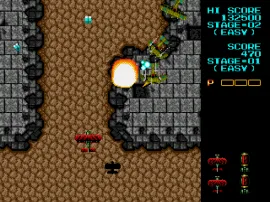
Fire Shark (Europe)
Fire Shark (Europe) - Shooter Classic
You control a biplane that moves around the screen while enemies stream from the top. The core loop involves shooting down waves of enemy aircraft, tanks, and battleships while dodging a constant hail of bullets. Power-ups appear frequently, letting you upgrade your main weapon or add options that increase firepower. The game keeps a brisk pace, demanding quick reflexes and pattern recognition as stages escalate in difficulty.
For fans of classic arcade shooters, Fire Shark on the Genesis holds up well. It shares DNA with other Toaplan titles like Truxton and Twin Cobra, offering the same satisfying, no-frills shooting action. It is not a groundbreaking port but a solid, faithful translation of the coin-op. If you enjoy straightforward shoot-'em-ups from the late eighties, this is worth a few credits on a rainy afternoon.
How to Play Fire Shark (Europe) Online
Start the game by pressing Enter at the title screen. You control a biplane that moves across the playfield with the Arrow Keys. Your goal is to survive each stage by shooting down all enemy fighters, ground targets, and mid-bosses before facing a large end-of-level boss. The core loop is straightforward: dodge bullets, collect power-ups (most often from destroyed red enemies), and kill everything that moves.
New players should focus on learning enemy patterns and not staying off the sides of the screen - enemies often approach from edges. Your weapon can be upgraded several times; losing a life resets your power level, so try to avoid getting hit. The game is tough and demands memorising attack waves, but continues are unlimited on this Genesis port, giving you plenty of chances to practice.
Fire Shark (Europe) Keyboard Controls
Controls
- Arrow Keys: D-Pad / Movement
- X: A button
- S: B button
- Z: C button
- A: X button (6-button pad)
- Q: Y button (6-button pad)
- E: Z button (6-button pad)
- Enter: Start / Mode
Comments (0)