The game loads when you press Play · press “Play Now” inside the game if it asks.
Dinosaurs for Hire (USA)
Dinosaurs for Hire
Dinosaurs for Hire - Shooter Classic
- SEGA Genesis
- Shooter
- 5· 0 votes
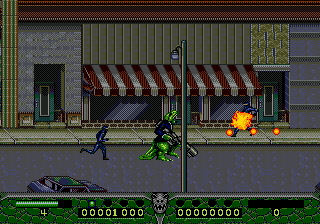
Dinosaurs for Hire is a run and gun shooter released for the SEGA Genesis in 1993, exclusively in North America. It was published by Sega and developed internally, though the exact team is not widely documented. The game puts a silly, over-the-top spin on the genre by arming dinosaurs with an arsenal of firearms.
You pick one of three dinosaur characters - each with their own weapon and stats - then blast through side-scrolling stages filled with enemy soldiers, vehicles, and bosses. The core loop is straightforward: move right, shoot everything in sight, pick up ammo and health, and survive until the level ends. There are also occasional bonus stages and power-ups to discover.
For fans of the Genesis run and gun library, Dinosaurs for Hire stands as a fun, if simple, entry. Its absurd concept and solid shooting action make it a quirky pick for retro enthusiasts, especially those who enjoy titles like Contra or Gunstar Heroes but want something a little weirder. It is not a deep game, but it delivers exactly what its title promises: dinosaurs with guns.
GAME INFO
- Platform
- SEGA Genesis
- Genre
- Shooter
- Released
- 1993
- Players
- 1
- Region
- USA
How to play Dinosaurs for Hire online
Press Start to begin the game. On the title screen, you can choose between three dinosaurs: each has different speed, weapon spread, and special attack. Use the D-Pad to highlight your pick and press X to confirm.
Once in a stage, your goal is to reach the end by shooting every enemy you see. Hold S to fire your main weapon, and press Z to use a screen-clearing bomb (limited supply). Jump with X to avoid ground hazards and enemy attacks. Movement is horizontal only, so stay on your toes and watch for projectiles.
If your health runs out, you lose a life. Continue are limited, so try to memorize enemy patterns and collect ammo drops to keep your gun hot. The game is short but can be tough. Use the pause menu (Enter) to check your stats or restart if needed.
CONTROLS
Controls
- Arrow Keys: D-Pad / Movement
- X: A button
- S: B button
- Z: C button
- A: X button (6-button pad)
- Q: Y button (6-button pad)
- E: Z button (6-button pad)
- Enter: Start / Mode
Dinosaurs for Hire FAQ
Is Dinosaurs for Hire exclusive to SEGA Genesis or did it appear on other systems?
It was released only for the SEGA Genesis, with no ports to other consoles or computers. No official rereleases have been made.
Is Dinosaurs for Hire an official release, a fan hack, a prototype, or another kind of build?
It is a fully official commercial release, sold in stores during the Genesis era. It is not a hack, prototype, or fan project.
Who developed Dinosaurs for Hire?
The developer is not widely documented, though Sega published the title. Most sources attribute development to Sega's internal teams.
You may also like
All SEGA Genesis games











GAME INFO
- Platform
- SEGA Genesis
- Genre
- Shooter
- Released
- 1993
- Players
- 1
- Region
- USA
COMMENTS (0)
No comments yet. Be the first to share your thoughts.