Dash The Rabbit 2
Dash The Rabbit 2 Overview
Controls
Controls
- Arrow Keys = D-Pad
- X = A button (jump/confirm)
- S = B button (run/attack/cancel)
- Z = Y button
- A = X button
- Q = L shoulder
- E = R shoulder
- Enter = Start
- V = Select
Getting Started
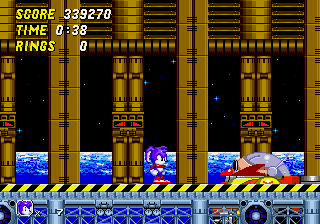
When you first boot up Dash The Rabbit 2, you will likely see a title screen with a simple menu. Press Start (Enter key) to begin the game. The main mode is a single-player campaign that takes you through a series of platforming stages. If the menus are in English (likely for a homebrew), navigate with the D-Pad and confirm with A button (X key).
The objective is to reach the end of each level while collecting carrots and avoiding spikes, pits, and enemies. You can run by holding the D-Pad left or right, and jump with the A button (X key). Use the B button (S key) to attack enemies in front of you. Your health is displayed as hearts, and losing all hearts costs a life. Extra lives are found hidden in levels or earned by collecting a certain number of items.
Boss fights at the end of each world require you to dodge patterns and strike weak points. There is no save function, so you must finish the game in one sitting or use emulator save states. If you are stuck, try searching for a level select code online - many homebrews include cheat options.
--- Who developed Dash The Rabbit 2? The specific developer or team behind Dash The Rabbit 2 is not widely documented. The original game is sometimes attributed to a small group of homebrew enthusiasts, but no official name is consistently linked to this second installment. What makes Dash The Rabbit 2 stand out among SEGA Genesis titles of its era? Since it is an unofficial homebrew, it stands out mainly as a rare example of a fan-made sequel on the platform. Its simple, direct platforming and rabbit protagonist give it a unique identity compared to the larger, more polished commercial releases of the 16-bit era. Is Dash The Rabbit 2 exclusive to SEGA Genesis or did it appear on other systems? This game appears to be exclusive to the SEGA Genesis / Mega Drive platform. There are no records of it being ported to other systems, likely because it was created as a free homebrew project for that specific hardware. --- Platformer Experience Dash The Rabbit 2, a homebrew platformer for SEGA Genesis. Play as a rabbit through side-scrolling levels with jumping and combat. A rare fan-made sequel for retro gaming enthusiasts. null null 1 homebrew null null null null null lowHow to Play Dash The Rabbit 2 Online
When you first boot up Dash The Rabbit 2, you will likely see a title screen with a simple menu. Press Start (Enter key) to begin the game. The main mode is a single-player campaign that takes you through a series of platforming stages. If the menus are in English (likely for a homebrew), navigate with the D-Pad and confirm with A button (X key).
The objective is to reach the end of each level while collecting carrots and avoiding spikes, pits, and enemies. You can run by holding the D-Pad left or right, and jump with the A button (X key). Use the B button (S key) to attack enemies in front of you. Your health is displayed as hearts, and losing all hearts costs a life. Extra lives are found hidden in levels or earned by collecting a certain number of items.
Boss fights at the end of each world require you to dodge patterns and strike weak points. There is no save function, so you must finish the game in one sitting or use emulator save states. If you are stuck, try searching for a level select code online - many homebrews include cheat options.
Dash The Rabbit 2 Keyboard Controls
Controls
- Arrow Keys: D-Pad / Movement
- X: A button
- S: B button
- Z: C button
- A: X button (6-button pad)
- Q: Y button (6-button pad)
- E: Z button (6-button pad)
- Enter: Start / Mode
Comments (0)











