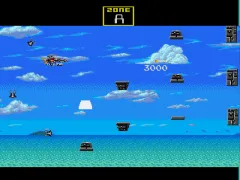
Darius II (Japan)
Darius II (Japan) Overview
Darius II is the direct sequel to the original Darius, a classic side-scrolling shooter that first appeared in arcades. This version is the Japanese release for the Sega Genesis, known in North America as Sagaia. Published by Taito, it brings the series' distinctive underwater sci-fi setting and giant robotic fish boss battles to the 16-bit console, sticking close to the arcade formula while making adjustments for the hardware.
How to Play Darius II (Japan) Online
Getting Started
When you boot up Darius II, you'll see a title screen in Japanese. Press Start to skip it, then you'll usually enter a brief weapon select or item pick screen - press A or B to confirm your choices. The core loop is straightforward: your ship automatically scrolls from left to right through watery stages, and you must shoot down enemies while dodging their patterns. Collect the orange orbs that drop from destroyed enemies to power up your shot, and look for special floating pods that grant shields or extra weapons.
Each stage ends with a boss fight against a massive mechanical sea creature, often inspired by real ocean life. The game gives you a set number of lives and continues - using a continue will restart you from the beginning of the current zone. Since the menus are in Japanese, stick with the default options if you're not sure; they're perfectly playable. Just focus on memorizing enemy patterns and grabbing power-ups to survive the later zones.
Darius II (Japan) Keyboard Controls
Controls
- Arrow Keys: D-Pad / Movement
- X: A button
- S: B button
- Z: C button
- A: X button (6-button pad)
- Q: Y button (6-button pad)
- E: Z button (6-button pad)
- Enter: Start / Mode
Comments (0)