The game loads when you press Play · press “Play Now” inside the game if it asks.
Dai Makaimura (Japan)
Dai Makaimura
Dai Makaimura on Genesis
- SEGA Genesis
- Platformer
- 5· 0 votes
GAME INFO
- Platform
- SEGA Genesis
- Genre
- Platformer
- Released
- 1993
- Players
- 1
- Region
- Japan
How to play Dai Makaimura online
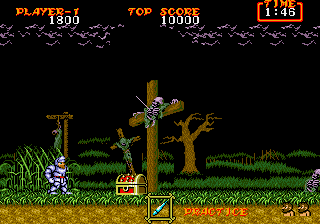
Getting started: When you boot the game, you'll see a title screen with Japanese text. Press Enter to start. You'll then see a simple menu with options like "Game Start" or "Continue" - the top option is usually Start. Once in the game, you control Arthur with the arrow keys. Jump with X and shoot with S. The core objective is to reach the end of each level while avoiding enemies and hazards.
The game is tough: you lose your armor after one hit and die after a second. Collecting a chest may give you a weapon upgrade, but sometimes it's a trap. Watch out for flying enemies and bottomless pits. If you die, you restart from the beginning of the stage unless you have a continue (you get a limited number). The game saves nothing, so it's all about memorization and precise timing.
Because menus are in Japanese, you might accidentally select the wrong option. The game's layout is simple: Start from the left and go right. There's no save feature, so plan on playing in one sitting. This is a pure arcade-style port, so expect old-school difficulty.
CONTROLS
Controls
- Arrow Keys: D-Pad / Movement
- X: A button
- S: B button
- Z: C button
- A: X button (6-button pad)
- Q: Y button (6-button pad)
- E: Z button (6-button pad)
- Enter: Start / Mode
Dai Makaimura FAQ
Is Dai Makaimura exclusive to SEGA Genesis or did it appear on other systems?
Dai Makaimura is the Japanese title for the Sega Genesis port of Ghosts 'n Goblins. The original arcade game and many later versions appeared on various platforms, but this specific Genesis/Mega Drive port was only released in Japan.
Is Dai Makaimura an official release, a fan hack, a prototype, or another kind of build?
It is an official Capcom release. The game was commercially published and distributed in Japan in 1993. It is not a hack, translation, or prototype.
Does Dai Makaimura have a multiplayer or co-op mode?
No. Like the original arcade game, it is a single-player only experience. There is no two-player mode or co-op option.
You may also like
All SEGA Genesis games











GAME INFO
- Platform
- SEGA Genesis
- Genre
- Platformer
- Released
- 1993
- Players
- 1
- Region
- Japan
COMMENTS (0)
No comments yet. Be the first to share your thoughts.