Corporation (Europe)
Corporation (Europe): Genesis Shooter
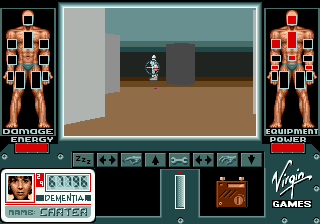
Corporation is an early first-person shooter that hit the SEGA Genesis in Europe, originally released in 1992. This game was developed by Core Design, the studio later famous for Tomb Raider, and it arrived during a time when the Genesis was better known for side-scrollers and platformers. If you've heard of Cyber-Cop, that's the same title - Corporation is the European name for that launch.
You control a cybernetic cop working through maze-like stages, blasting hostile robots and mutants with a variety of weapons. The viewpoint is first-person, a rarity on the Genesis, and movement is handled with the D-Pad while aiming and firing use the main action buttons. Health and ammunition are scarce, so you must scavenge supplies and find keys to open doors to the exit.
For retro fans, Corporation is a fascinating early console FPS that tried to bring Doom-like action to 16-bit hardware. It's rough around the edges - blocky graphics, simple enemy AI - but it captures the genre's early spirit. If you enjoy classic shooters and want to see how the Genesis handled them before Wolfenstein 3D's port, this is a solid, historically interesting pick.
How to Play Corporation (Europe) Online
Start a new game by pressing Enter at the title screen. You begin in a dim corridor with a pistol. Use Arrow Keys to move forward, backward, and strafe. Press S (B button) to fire at enemies - aim by facing them directly. Explore each maze-like stage to find colored keys that unlock matching doors. Your goal is to reach the level exit, usually marked by a door or a teleporter. Health and ammo refills are scattered, so watch your gauges and grab everything you can. The game does not include a save function on this version, so use the password system - write down the code shown at the end of each stage to continue later.
Corporation (Europe) Keyboard Controls
Controls
- Arrow Keys: D-Pad / Movement
- X: A button
- S: B button
- Z: C button
- A: X button (6-button pad)
- Q: Y button (6-button pad)
- E: Z button (6-button pad)
- Enter: Start / Mode



Comments (0)