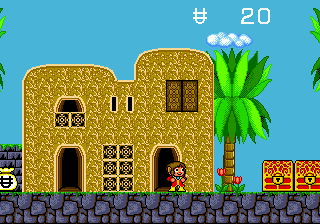
Alex Kidd - Tenkuu Majou (Japan)
Inside Alex Kidd - Tenkuu Majou (Japan)
Alex Kidd - Tenkuu Majou is a platformer released for the Sega Genesis in Japan, published by Sega. It is part of the broader Alex Kidd series, which originally debuted on the Master System. This title arrived early in the Genesis library, offering a continuation of Alex's adventures in a new hardware era. The Japanese version features menus and text entirely in Japanese, which may affect navigation for non-Japanese speakers.
Players guide Alex through side-scrolling levels filled with enemies, obstacles, and collectible items. The core objective is to reach the end of each stage while managing health and power-ups. Unlike some later Genesis platformers, this game emphasizes careful movement and timing rather than speed. Specific mechanics, such as the ability to shoot projectiles or transform abilities, are present but not widely documented outside of gameplay footage.
For fans of classic platformers, Alex Kidd - Tenkuu Majou offers a glimpse into Sega's early Genesis strategy and the evolution of the Alex Kidd franchise. It is a more deliberate and puzzle-oriented experience compared to Sonic the Hedgehog, appealing to those who enjoy methodical platforming. While it is not a hidden gem in the sense of being obscure, it holds historical value as an import title that showcases the series' transition to 16-bit hardware.
How to Play Alex Kidd - Tenkuu Majou (Japan) Online
Getting Started
Press Enter to start the game. The title screen is in Japanese, but the main menu options are typically straightforward: the topmost selection begins a new game, and the second often loads a save state if available. Use the D-Pad to navigate and X to confirm.
The core loop involves moving right through levels, jumping over pits, and defeating enemies by pressing S to attack. Colored orbs and items appear throughout stages and should be collected for points or power-ups. Each level ends with a boss fight that usually requires pattern recognition.
Because the game is entirely in Japanese, you may encounter text-based instructions or shop menus. Use trial and error to understand what each option does, or look for community-written guides online if you get stuck. The game autosaves progress only at certain points, so using the browser's save state feature from the emulator menu is recommended.
Alex Kidd - Tenkuu Majou (Japan) Keyboard Controls
Controls
- Arrow Keys: D-Pad / Movement
- X: A button
- S: B button
- Z: C button
- A: X button (6-button pad)
- Q: Y button (6-button pad)
- E: Z button (6-button pad)
- Enter: Start / Mode






Comments (0)