The game loads when you press Play · press “Play Now” inside the game if it asks.
Wizard Pinball (Europe)
Wizard Pinball
Wizard Pinball Overview
GAME INFO
How to play Wizard Pinball online
Getting Started
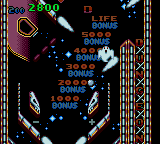
When you boot up Wizard Pinball, you will see a title screen. Press Enter to start. The game immediately drops the ball onto a single table with bumpers, ramps, and targets. Your goal is to keep the ball in play as long as possible by flipping the left and right flippers with the D-Pad (usually up/down or left/right depending on configuration). Use the X and S buttons to nudge the table slightly if needed, but be careful not to tilt.
The core loop is simple: launch the ball, score points by hitting lit targets or completing loops, and watch your score climb. There are no save features or multiple tables; it is a straightforward high-score chase. If the ball drains, you get a few replays before game over. Just keep practicing to improve your timing and reflexes.
Because this is a European release, the menus are in English, so navigation is straightforward. No special tricks required - just standard pinball rules apply.
CONTROLS
Controls
- Arrow Keys: D-Pad / Movement
- X: Button 1
- S: Button 2
- Enter: Start / Pause
Wizard Pinball FAQ
Who developed Wizard Pinball?
The developer of Wizard Pinball is not widely documented. No specific studio or individual is officially credited in available resources.
Does Wizard Pinball have a multiplayer or co-op mode?
Wizard Pinball is a single-player only game. There is no multiplayer or co-op mode available on the Game Gear.
Is Wizard Pinball exclusive to Game Gear or did it appear on other systems?
Wizard Pinball appears to have been released only for the Sega Game Gear in Europe. No ports or versions for other platforms are known.
COMMENTS (0)
No comments yet. Be the first to share your thoughts.