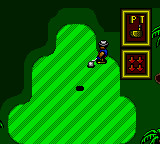
The game loads when you press Play · press “Play Now” inside the game if it asks.
Super Golf (Japan)
Super Golf
Super Golf Overview
GAME INFO
How to play Super Golf online
Getting Started
When you boot up Super Golf, you're typically presented with a title screen and a menu in Japanese. Press Start to begin, then use the D-Pad to navigate options like "Start Game" or "Course Select." Since the menus are in Japanese, a little trial and error might be needed, but the core flow is intuitive: choose a club, aim your shot, then use the power meter by pressing the A button (X key) to start the swing and again to set power and accuracy.
The game follows standard golf rules: you play through 18 holes, trying to get the ball into the cup in as few strokes as possible. Each hole starts from the tee box; select your club based on distance and hazards. The D-Pad moves a cursor to aim left or right, and the power meter appears when you press the swing button. Timing is key - press once to start the meter, again to lock power, and a third time for accuracy if the game uses a three-click system. Watch out for rough, sand traps, and water hazards.
There's no career mode or character progression - just a straight round of golf. If you're familiar with other 8-bit golf games like Golf on NES or the Game Gear's own Arnold Palmer Golf, you'll feel right at home. The Japanese text may be a hurdle, but the gameplay is universal: aim, swing, and sink the putt. Focus on keeping your drives in the fairway and your putts short to avoid high scores.
CONTROLS
Controls
- Arrow Keys: D-Pad / Movement
- X: Button 1
- S: Button 2
- Enter: Start / Pause
Super Golf FAQ
Roughly how long does it take to finish Super Golf?
A full 18-hole round typically takes between 30 and 45 minutes, depending on how quickly you play and whether you use any mulligans. The game has no save feature, so you'll need to finish in one sitting.
In what year was Super Golf originally released?
The exact release year for this Japanese Game Gear title is not widely documented in accessible records. It likely came out sometime in the early 1990s, but no precise date is confirmed.
Who developed Super Golf?
The development studio behind Super Golf is not widely documented; it may have been produced by an internal Sega team or a third-party developer. No official attribution survives in commonly available sources.


COMMENTS (0)
No comments yet. Be the first to share your thoughts.