CHOOSE A VERSION
2 versions · same consoleChoose an original release, regional version, revision, bootleg or clearly labelled ROM hack/mod, then press Play. Hacks may change the gameplay. Switching versions restarts the player.
Selected: Default · Japan · Japan
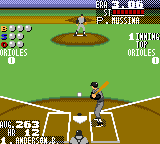
The game loads when you press Play · press “Play Now” inside the game if it asks.
Nomo Hideo no World Series Baseball (Japan)
Nomo Hideo no World Series Baseball
Inside Nomo Hideo no World Series Baseball
GAME INFO
How to play Nomo Hideo no World Series Baseball online
Getting Started
Start by loading the ROM in an emulator. The game will present a title screen with Hideo Nomo's name and likely a small animation. Press Start (Enter) to proceed. Since this is a Japanese-only release, all menus are in kanji and kana. Look for familiar baseball terms like "試合" (game) or "オプション" (options) if you know basic Japanese. The first screen after the title is probably a mode select - choose "試合" for a standard game or "練習" for practice.
The core loop is simple: you control a team in a baseball game. On offense, time your swing by pressing the A button (X key) when the pitch arrives. On defense, select pitches with the D-pad and press A to throw; you can aim with the D-pad while pitching. Fielding is automatic in many such titles, but you can move fielders with the D-pad when the ball is in play. The game likely uses a cursor for batting - position it with the D-pad before swinging.
Important: The game does not feature any English options, so if you can't read Japanese, expect to experiment. The basics are intuitive: use Start to advance through screens, A to confirm, B (S key) to cancel or go back. If you get stuck, pressing various buttons usually gets you back to the main menu. A typical game lasts nine innings unless you find a setting to change it. Don't worry about getting everything perfect - just enjoy some retro baseball with Hideo Nomo.
CONTROLS
Controls
- Arrow Keys: D-Pad / Movement
- X: Button 1
- S: Button 2
- Enter: Start / Pause
Nomo Hideo no World Series Baseball FAQ
Is Nomo Hideo no World Series Baseball exclusive to Game Gear or did it appear on other systems?
It appears to be exclusive to the Sega Game Gear. No ports to other consoles or handhelds have been documented. It was never released outside Japan.
Which regions was Nomo Hideo no World Series Baseball released in?
It was released only in Japan. There is no known North American or European release for this title.
Roughly how long does it take to finish Nomo Hideo no World Series Baseball?
There is no definitive campaign length. A full nine-inning game takes roughly 30 to 60 minutes depending on play speed. Completion time may vary if there are multiple modes, but specific information is not widely documented.


COMMENTS (0)
No comments yet. Be the first to share your thoughts.