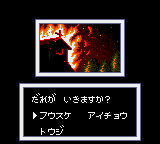
The game loads when you press Play · press “Play Now” inside the game if it asks.
Ninku 2 - Tenkuuryuu e no Michi (Japan)
Ninku 2 - Tenkuuryuu e no Michi
Ninku 2 - Tenkuuryuu e no Michi Overview
GAME INFO
More Ninku Games
Ready for another round? Explore more Ninku games and console editions. Choose a game below to play it on its own page.
How to play Ninku 2 - Tenkuuryuu e no Michi online
Getting Started
When you first boot up Ninku 2, you'll see a Japanese title screen and menu. Since this is a Japan-only release, all text is in Japanese. You'll want to navigate using the D-Pad and press the A button (key X) to confirm. The first option is typically "Start" or "New Game". If you see a selection of characters, pick one to begin.
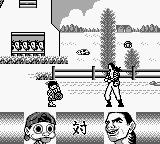
The core loop is straightforward: you control a character from the Ninku series as they run through levels, jump over pits, and defeat enemies using punches, kicks, or special attacks. You'll find health pick-ups and power-ups along the way. The game is level-based, moving from left to right, and each stage ends with a boss fight. Because the menus are in Japanese, you may need to experiment to change settings or continue after a game over.
Pay attention to the HUD at the top of the screen - it shows your health, lives, and possibly a score. Unlike some Game Gear action games, Ninku 2 has a bit of a learning curve if you're not familiar with the anime's moves. The B button (key S) is your main attack, and you can combine it with directional inputs for different moves. Take your time to learn enemy patterns, as lives are limited.
CONTROLS
Controls
- Arrow Keys: D-Pad / Movement
- X: Button 1
- S: Button 2
- Enter: Start / Pause
Ninku 2 - Tenkuuryuu e no Michi FAQ
Who developed Ninku 2 - Tenkuuryuu e no Michi?
The development studio behind Ninku 2 is not widely documented. It was likely handled by an internal or contracted team working on anime-licensed Game Gear titles, but specific creator information is scarce.
Which regions was Ninku 2 - Tenkuuryuu e no Michi released in?
This game was released exclusively in Japan. It never saw an official release in North America or Europe, making it a sought-after import for collectors of the Game Gear library.
In what year was Ninku 2 - Tenkuuryuu e no Michi originally released?
The original release year is not clearly recorded in available sources. It likely came out in the mid-1990s, around the time the Ninku anime was airing, but no precise year has been confirmed.


COMMENTS (0)
No comments yet. Be the first to share your thoughts.