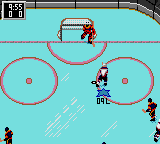
The game loads when you press Play · press “Play Now” inside the game if it asks.
NHL Hockey (USA, Europe)
NHL Hockey
About NHL Hockey
GAME INFO
How to play NHL Hockey online
Getting Started
When you boot up NHL Hockey, you'll be taken to a title screen. Press Start to proceed to the team selection menu. Use the D-pad to choose a team from the available NHL squads, then confirm your choice. You can also set the game length and difficulty before starting.
The core loop is simple: win face-offs, pass the puck to open teammates, take shots on goal, and defend your own net. The A button shoots, the B button passes or checks, and the D-pad controls movement. Pay attention to the on-ice indicators for puck possession and player stamina. The game uses a top-down perspective similar to the console versions.
If this is your first time, start on an easier difficulty to get used to the controls. The Game Gear's smaller screen means you'll need to watch the radar or keep an eye on off-screen players. Penalties are called for tripping, hooking, and other infractions, so play cleanly unless you want to be short-handed.
CONTROLS
Controls
- Arrow Keys: D-Pad / Movement
- X: Button 1
- S: Button 2
- Enter: Start / Pause
NHL Hockey FAQ
Who developed NHL Hockey?
Electronic Arts developed NHL Hockey under the EA Sports label. The game was created by the same team that worked on the Genesis and PC versions.
Is there anything iconic or memorable about NHL Hockey?
This was the first entry in what would become a long-running NHL series for EA Sports. On Game Gear, it stands out as a capable portable adaptation of a console sports title, a rarity at the time.
What type of game is NHL Hockey?
It is a sports simulation that focuses on realistic ice hockey rules and team play. Players control skaters and a goalie in a five-on-five match with penalties and face-offs.
COMMENTS (0)
No comments yet. Be the first to share your thoughts.