CHOOSE A VERSION
2 versions · same consoleChoose an original release, regional version, revision, bootleg or clearly labelled ROM hack/mod, then press Play. Hacks may change the gameplay. Switching versions restarts the player.
Selected: Default · Japan · Japan
The game loads when you press Play · press “Play Now” inside the game if it asks.
Madou Monogatari A - Dokidoki Vacation (Japan)
Madou Monogatari A - Dokidoki Vacation
Madou Monogatari A - Dokidoki Vacation: GG RPG
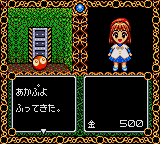
You take control of Arle, the series' protagonist, and guide her through a series of grid-based dungeons filled with enemies and puzzles. The core gameplay involves navigating these mazes, casting spells by selecting from a menu of magic cards, and solving simple environmental puzzles to progress. Battles are turn-based; you choose a spell or item and watch the results play out on screen. The game also includes light exploration elements and occasional NPC interactions, all presented with Compile's signature cute character art.
For fans of the Madou Monogatari or Puyo Puyo franchises, this entry offers a piece of Compile's history on a portable system. It's a straightforward, charming dungeon crawler that doesn't overstay its welcome. While it never left Japan and the menus are entirely in Japanese, the gameplay is simple enough to pick up with a little trial and error. If you enjoy retro RPGs with a puzzle twist, it's worth a look.
GAME INFO
How to play Madou Monogatari A - Dokidoki Vacation online
Getting Started
When you start Madou Monogatari A - Dokidoki Vacation, you'll be greeted by a title screen in Japanese. Press Start to begin a new game. You'll then be presented with a menu for choosing a save slot (three available) and perhaps entering a name (using hiragana). The game is entirely in Japanese, but the menus are simple: the first option is usually "New Game" and the second "Continue" or "Load".
Once in the game, you control Arle using the D-Pad to move around. Explore the dungeon rooms and talk to NPCs by pressing the A button (X on keyboard). When you encounter an enemy, the screen will shift to a battle view. You'll see a menu of actions: typically the first option is "Fight" or "Magic", second is "Item", third is "Run". Use A to select and B (S) to cancel or go back. Start opens the main menu for saves and items.
The core loop is: explore a floor, find keys or solve puzzles to open doors, defeat enemies to gain experience and items, and find the exit to the next floor. Magic spells are found as items and can be equipped. Pay attention to the spell names (they're in Japanese, but the symbols are consistent). If you get stuck, try using items from the inventory or backtracking. The game is not very long, so patience with the language barrier pays off.
CONTROLS
Controls
- Arrow Keys: D-Pad / Movement
- X: Button 1
- S: Button 2
- Enter: Start / Pause
Madou Monogatari A - Dokidoki Vacation FAQ
Who developed Madou Monogatari A - Dokidoki Vacation?
Compile, the Japanese developer known for the Puyo Puyo series, created this Game Gear title. They handled both development and publishing internally.
Roughly how long does it take to finish Madou Monogatari A - Dokidoki Vacation?
A standard playthrough runs between three and five hours depending on how thoroughly you explore. The dungeons are short but can be confusing without Japanese knowledge, which might add a little time.
Is Madou Monogatari A - Dokidoki Vacation exclusive to Game Gear or did it appear on other systems?
This specific entry was released only for the Sega Game Gear in Japan. Other games in the Madou Monogatari lineage appeared on home computers and consoles, but this portable version stands alone.


COMMENTS (0)
No comments yet. Be the first to share your thoughts.