The game loads when you press Play · press “Play Now” inside the game if it asks.
Lunar - Sanposuru Gakuen (Japan)
Lunar - Sanposuru Gakuen
Lunar - Sanposuru Gakuen on GG
GAME INFO
How to play Lunar - Sanposuru Gakuen online
Getting Started
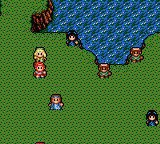
When you start the game, you will see Japanese menus. If you are using the unofficial English translation patch, the menus will be in English. The game begins with a brief story scene introducing the school setting. From there, you can move your character around the map using the D-Pad and interact with objects or people by pressing the A button (X key).
The core loop in Lunar: Sanposuru Gakuen involves exploring the school and surrounding areas, talking to non-player characters to advance the story, and engaging in random turn-based battles. Battles are viewed from a side perspective; you select commands like Attack, Magic, or Item from a menu. Defeating enemies earns experience points and gold, which level up your characters and let you buy equipment.
Be aware that the original Japanese release has no in-game English text, so navigating menus and understanding story cues requires either knowledge of Japanese or a patched ROM. The game saves progress using a battery-backed save file, which is typical for Game Gear RPGs. If you are playing online via emulator, make sure to use the emulator's save state feature to avoid losing progress.
CONTROLS
Controls
- Arrow Keys: D-Pad / Movement
- X: Button 1
- S: Button 2
- Enter: Start / Pause
Lunar - Sanposuru Gakuen FAQ
Who developed Lunar - Sanposuru Gakuen?
The game was developed by Ehrgeiz, with the story written by Studio Alex. They were responsible for the Lunar series at the time.
What type of game is Lunar - Sanposuru Gakuen?
It is a role-playing game (RPG) set in the Lunar universe. The gameplay involves exploration, story progression, and turn-based combat.
Is Lunar - Sanposuru Gakuen exclusive to Game Gear or did it appear on other systems?
This title was released only for the Sega Game Gear, exclusively in Japan. It did not appear on any other platforms officially.







COMMENTS (0)
No comments yet. Be the first to share your thoughts.