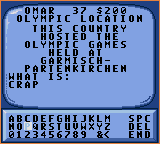
The game loads when you press Play · press “Play Now” inside the game if it asks.
Jeopardy! - Sports Edition (USA, Europe)
Jeopardy! - Sports Edition
About Jeopardy! - Sports Edition
- Game Gear
- Board Game
- 5· 0 votes
GAME INFO
- Platform
- Game Gear
- Genre
- Board Game
- Region
- USA, Europe
How to play Jeopardy! - Sports Edition online
Getting Started
When you boot up Jeopardy Sports Edition, you first choose between a single player game or a two player match. In single player, you compete against two computer opponents; in two player, a friend takes control of one of the contestants. The game proceeds through three rounds: Jeopardy, Double Jeopardy, and Final Jeopardy, each with categories like "Baseball" or "Winter Sports".
Selecting a category and a dollar value (from $100 to $500 in the first round, then $200 to $1000 in Double Jeopardy) reveals a clue, which you read then try to answer in the form of a question using the on screen keyboard. You use the D Pad to scroll through letters and confirm each selection with the A button. B button cancels a letter choice. Speed matters the faster you buzz in, the more opportunities you get.
The core loop is all about listening to (or reading) the clue, then typing your response before time runs out. If you answer incorrectly, you lose that amount. Final Jeopardy lets you wager any amount you have, then answer a single clue. The player with the highest total wins. There's no save feature, so plan to finish a full game in one sitting it usually takes about 20 minutes.
CONTROLS
Controls
- Arrow Keys: D-Pad / Movement
- X: Button 1
- S: Button 2
- Enter: Start / Pause
Jeopardy! - Sports Edition FAQ
Can players save progress in Jeopardy! - Sports Edition?
Jeopardy Sports Edition on Game Gear does not include a save or password system. Each game must be played start to finish in one session, which typically lasts around 15 to 20 minutes.
Does Jeopardy! - Sports Edition have a multiplayer or co-op mode?
The game supports two players taking turns as contestants, but there is no cooperative mode. Two player mode is fully competitive, with each player controlling one of the three on screen contestants.
What makes Jeopardy! - Sports Edition stand out among Game Gear titles of its era?
It is one of the few sports trivia games on the system, offering a focused quiz experience rather than action gameplay. The portable format lets fans test their sports knowledge on the go, which was a novelty in the early 1990s.
You may also like
All Game Gear games




GAME INFO
- Platform
- Game Gear
- Genre
- Board Game
- Region
- USA, Europe
COMMENTS (0)
No comments yet. Be the first to share your thoughts.