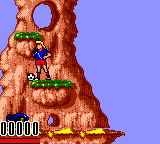
The game loads when you press Play · press “Play Now” inside the game if it asks.
Hurricanes (USA, Europe)
Hurricanes
What is Hurricanes?
GAME INFO
- Platform
- Game Gear
- Genre
- Action
- Publisher
- U.S. Gold
- Developer
- Acclaim Studios London
- Released
- 1994
- Players
- 1
- Region
- USA, Europe
How to play Hurricanes online
Getting Started
When you start Hurricanes, the game likely presents a title screen. Press Enter to begin. You control a character from the animated series, moving through side-scrolling levels. Use the D-Pad to move left and right, and press X to jump. Experiment with the B button to see if it triggers an attack or action.
The objective in each stage is to reach the end by avoiding hazards and defeating enemies. The game does not have a tutorial, so the best way to learn is to play through the first level. If you get stuck, try using the jump button to reach higher platforms or avoid pits.
Since the exact mechanics are not well documented, feel free to experiment with the shoulder buttons (Q and E) and the Y button (Z) - they may trigger secondary actions. The core gameplay is straightforward: keep moving right and survive until the stage ends.
CONTROLS
Controls
- Arrow Keys: D-Pad / Movement
- X: Button 1
- S: Button 2
- Enter: Start / Pause
Hurricanes FAQ
Is there anything iconic or memorable about Hurricanes?
Hurricanes is best remembered as a licensed tie-in to a short-lived animated series. Its gameplay is typical of mid-90s portable platformers and does not introduce any standout features. For collectors, its relative obscurity makes it a curiosity.
Is Hurricanes exclusive to Game Gear or did it appear on other systems?
Hurricanes was also released on the Sega Genesis/Mega Drive, making it not exclusive to the Game Gear. Both versions share the same basic premise but differ in graphic detail and level design due to hardware limitations.
What type of game is Hurricanes?
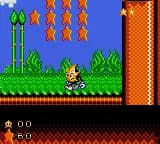
Hurricanes is a side-scrolling platformer. The player controls a character moving through stages, jumping over obstacles, and defeating enemies. It belongs to the action genre common on the Game Gear.
You may also like
All Game Gear games


GAME INFO
- Platform
- Game Gear
- Genre
- Action
- Publisher
- U.S. Gold
- Developer
- Acclaim Studios London
- Released
- 1994
- Players
- 1
- Region
- USA, Europe
COMMENTS (0)
No comments yet. Be the first to share your thoughts.