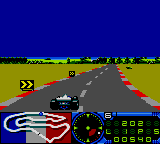
The game loads when you press Play · press “Play Now” inside the game if it asks.
F1 (USA, Europe)
F1
F1 - Racing Classic
GAME INFO
- Platform
- Game Gear
- Genre
- Racing
- Publisher
- Domark Software
- Developer
- Lankhor
- Released
- 1993
- Region
- USA, Europe
How to play F1 online
Getting Started
When you boot F1 (USA, Europe) on the Game Gear, you will likely be taken to a title screen with options like 'Single Race' or 'Championship' mode. The language is in English since this is a US and European release. Press Start or Confirm to proceed. You may need to choose a driver or car from a selection screen, though the exact names are not widely documented.
The core loop is straightforward: select a race or championship, then drive your Formula 1 car around a circuit for a set number of laps. Use the D-Pad to steer and the B or A button for accelerate (or brake). The game uses a simple gauge or overlay to show speed and lap position. Your goal is to finish first by passing opponents and avoiding crashes that slow you down. Each race ends after the final lap, and you will see your finishing position.
If you are new to the genre, start with a single race to learn the track layout. Timing your braking before sharp turns is crucial because the car can easily spin out. There is no health bar or weapons; it is pure racing. The game likely awards points for finishing positions, leading to a championship tally if you play multiple races. Just keep your car on the road and try to set fast lap times.
CONTROLS
Controls
- Arrow Keys: D-Pad / Movement
- X: Button 1
- S: Button 2
- Enter: Start / Pause
F1 FAQ
Is F1 an official release, a fan hack, a prototype, or another kind of build?
F1 (USA, Europe) is an official commercial release for the Sega Game Gear. It was manufactured and sold through retail channels, not a fan modification or unfinished prototype.
Is F1 exclusive to Game Gear or did it appear on other systems?
This version of F1 was released for the Game Gear. It may have also appeared on other Sega platforms like the Master System or Genesis under similar titles, but the specific relationship between those versions is not widely documented.
Who developed F1?
The developer of F1 (USA, Europe) for Game Gear is not widely documented in standard retro gaming references. It was likely produced by a studio contracted by Sega, but no specific team name is consistently attributed.
You may also like
All Game Gear games


GAME INFO
- Platform
- Game Gear
- Genre
- Racing
- Publisher
- Domark Software
- Developer
- Lankhor
- Released
- 1993
- Region
- USA, Europe
COMMENTS (0)
No comments yet. Be the first to share your thoughts.