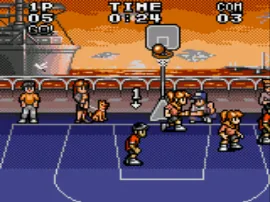
The game loads when you press Play · press “Play Now” inside the game if it asks.
Dunk Kids (Japan)
Dunk Kids
Dunk Kids - Sports Classic
GAME INFO
How to play Dunk Kids online
Getting Started
When you start Dunk Kids, you'll likely see a title screen and a menu in Japanese. The first option is probably "1P Game" (single player) or "2P Game" (versus). Use the D-pad to highlight and press the A button (X key) to confirm. Controls involve moving your player with the D-pad, passing or stealing with the B button (S key), and jumping or shooting with the A button (X key).
The core loop is a standard basketball match: you have a timer, and you need to score more points than the opponent. Move towards the basket, pass to teammates if available, and aim for dunks by jumping close to the hoop while holding the ball. The computer AI is basic, so you can often drive past defenders. Defense involves pressing B to try to steal or block.
Since the game is entirely in Japanese, trial and error may be needed for menu navigation. The gameplay itself is straightforward once you're on the court. There is no in-game tutorial, so expect to learn by playing. If you're unfamiliar with the controls, practice dribbling and shooting in a quick match first.
CONTROLS
Controls
- Arrow Keys: D-Pad / Movement
- X: Button 1
- S: Button 2
- Enter: Start / Pause
Dunk Kids FAQ
Which regions was Dunk Kids released in?
Dunk Kids was released exclusively in Japan. No official versions were released in North America or Europe.
In what year was Dunk Kids originally released?
The exact release year is not widely documented. Sources suggest an early 1990s window, but a precise date is unavailable.
Can players save progress in Dunk Kids?
Dunk Kids does not include a save feature. Like many Game Gear sports games from that era, progress is not retained after turning off the console.
COMMENTS (0)
No comments yet. Be the first to share your thoughts.