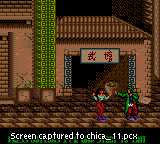
The game loads when you press Play · press “Play Now” inside the game if it asks.
Chicago Syndicate (USA, Europe)
Chicago Syndicate
What is Chicago Syndicate?
GAME INFO
How to play Chicago Syndicate online
Getting started: When you start Chicago Syndicate, you'll see a title screen and then a menu. Press Enter to start the game. You control Larcen Tyler, and the objective is to fight through waves of enemies in each stage. Use the D-Pad (Arrow Keys) to move left and right, and press S (B button) to attack. You can also jump with X (A button) and use special moves by combining directions and attack buttons.
The core loop is simple: enter a stage, defeat all enemies that appear, then face a boss at the end. Pay attention to enemy patterns and your health bar. There's no save feature on the original cartridge, so you must finish the game in one session. Practice the timing of your attacks and jumps to avoid damage while landing hits.
This is an English-language release, so menus and text are in English. No need to worry about language barriers. Just pick up and play, but be ready for a challenging brawler that demands quick reflexes.
CONTROLS
Controls
- Arrow Keys: D-Pad / Movement
- X: Button 1
- S: Button 2
- Enter: Start / Pause
Chicago Syndicate FAQ
Who developed Chicago Syndicate?
The developer of Chicago Syndicate is not widely documented in public sources. It was published by Sega, but the specific internal studio is unclear.
Can players save progress in Chicago Syndicate?
Chicago Syndicate does not include a save feature. Like most Game Gear games of its era, progress is lost when the console is turned off.
Is Chicago Syndicate exclusive to Game Gear or did it appear on other systems?
Chicago Syndicate was released only on the Sega Game Gear. It did not appear on any other platforms.





COMMENTS (0)
No comments yet. Be the first to share your thoughts.