The game loads when you press Play · press “Play Now” inside the game if it asks.
Army Men Sarges Heroes
Army Men Sarges Heroes
Getting to Know Army Men Sarges Heroes
- PlayStation PSX
- Action
- 5· 0 votes
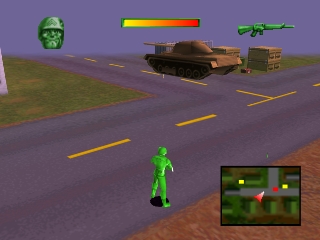
Army Men Sarges Heroes is an action game released for the PlayStation in 1999. Developed by 3DO, it is part of the Army Men series, which is known for its military-themed gameplay featuring toy soldiers. This title stands out as a third-person shooter that captures the essence of plastic army figures in a fun and engaging way.
In Army Men Sarges Heroes, players control Sergeant Hawk as he battles against the Tan army across various environments. The gameplay involves a mix of shooting, platforming, and strategic combat, where players navigate through levels filled with enemies and obstacles. The game includes a variety of weapons and power-ups, and players can utilize different tactics to complete missions, such as sneaking or going in guns blazing.
This game is worth trying today for its nostalgic appeal, especially for those who enjoyed toys and military-themed games in the late 90s. While it may not have the depth of more modern shooters, its charm lies in its simple yet satisfying gameplay loop. Compared to other titles of its era, Army Men Sarges Heroes offers a unique blend of action and humor, making it a fun experience for both casual gamers and retro enthusiasts alike.
GAME INFO
- Platform
- PlayStation PSX
- Genre
- Action
- Released
- 1999
- Players
- 1-2
- Region
- USA
More Army Men Sarges Heroes Games
Ready for another round? Explore more Army Men Sarges Heroes games and console editions. Choose a game below to play it on its own page.
How to play Army Men Sarges Heroes online
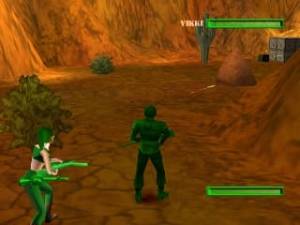
To get started in Army Men Sarges Heroes, first select your game mode from the main menu. You can choose to play through the campaign or opt for multiplayer options if available. The core gameplay loop involves completing missions by defeating enemies, collecting items, and navigating through various terrains that reflect the toy soldier theme.
As you progress, familiarize yourself with the controls and experiment with different weapons and strategies. Each level presents unique challenges, so adapting your approach can be crucial. Pay attention to your surroundings, as there are often hidden areas and power-ups that can enhance your gameplay experience.
CONTROLS
Controls
- Arrow Keys — D-Pad / Movement
- X — Cross ( × )
- S — Square ( □ )
- Z — Triangle ( △ )
- A — Circle ( ○ )
- Q — L1 shoulder
- E — R1 shoulder
- Enter — Start
- V — Select
Army Men Sarges Heroes FAQ
Who developed Army Men Sarges Heroes?
3DO developed Army Men Sarges Heroes, contributing to the Army Men series known for its engaging toy soldier gameplay.
What makes Army Men Sarges Heroes stand out among PlayStation PSX titles of its era?
This game offers a unique blend of action and humor, set within a whimsical world of toy soldiers, which was less common among other titles at the time.
Is Army Men Sarges Heroes considered easy to pick up or challenging?
The game is generally accessible for newcomers, but some levels can present a challenge as players must navigate enemy tactics and environmental obstacles.
You may also like
All PlayStation PSX games











GAME INFO
- Platform
- PlayStation PSX
- Genre
- Action
- Released
- 1999
- Players
- 1-2
- Region
- USA
COMMENTS (0)
No comments yet. Be the first to share your thoughts.