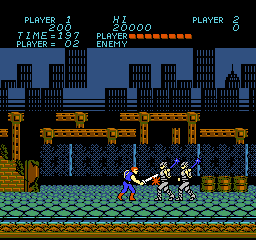
Trojan (Europe)
Trojan (Europe): NES Action
Trojan (Europe) is an action game that was released for the Nintendo Entertainment System. Originally developed by Capcom, this title made its way to Europe after its initial launch in Japan. Players navigate through various levels, battling enemies and overcoming obstacles, all within the classic 8-bit platforming style that characterized many games of its era.
In Trojan, players take control of a warrior tasked with defeating enemies using a combination of melee attacks and ranged weapons. The gameplay involves moving through side-scrolling levels, engaging in combat, and collecting power-ups. Players must navigate through different environments while utilizing their skills to defeat bosses and progress through the stages, which is typical of action games from this time period.
Despite being a relatively niche title, Trojan offers a nostalgic experience for those who enjoy classic action games. Its straightforward mechanics and engaging combat provide a solid challenge, making it worth a try for retro gaming enthusiasts. While it may not have the same recognition as some of Capcom's other franchises, its unique blend of action and adventure captures the essence of the NES era, appealing to both newcomers and seasoned players alike.
How to Play Trojan (Europe) Online
Getting started with Trojan involves selecting your game mode and familiarizing yourself with the controls. Once you begin, your main objective is to traverse through the various levels, defeating enemies and collecting power-ups along the way. Timing your attacks and learning enemy patterns are crucial for advancing through the game.
As you progress, you'll encounter different types of enemies and bosses that require specific strategies to defeat. Pay attention to your health and ammunition, as managing these resources will be key to surviving the challenges ahead. The core loop revolves around combat, exploration, and upgrading your abilities, which keeps the gameplay engaging and rewarding.
Trojan (Europe) Keyboard Controls
Controls
- Arrow Keys — D-Pad / Movement
- X — A button (jump / confirm)
- S — B button (run / attack / cancel)
- Enter — Start / Pause
- V — Select




Comments (0)