Teenage Mutant Ninja Turtles (Italy)
Getting to Know Teenage Mutant Ninja Turtles (Italy)
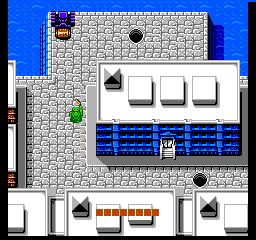
Teenage Mutant Ninja Turtles (Italy) is a variant of the classic action game released for the Nintendo Entertainment System. This version is notable for its Italian localization and was developed during the height of the TMNT craze in the late 1980s and early 1990s. The game falls into the action genre and features side-scrolling gameplay typical of the era, capturing the spirit of the beloved comic and animated series.
In this game, players take control of the Teenage Mutant Ninja Turtles as they navigate through various levels filled with enemies and obstacles. The gameplay involves a mix of platforming and combat, where players can switch between different turtles, each with unique abilities. Players must defeat enemies, collect items, and face bosses at the end of each level, all while exploring the vibrant environments inspired by the TMNT universe.
Today, Teenage Mutant Ninja Turtles (Italy) serves as a nostalgic piece for those who grew up during the NES era. While it may not be the most complex title in the TMNT franchise, it offers a unique take for collectors and fans of retro gaming. Its simplicity and charm make it an interesting experience, especially for anyone looking to explore lesser-known titles from the NES library.
How to Play Teenage Mutant Ninja Turtles (Italy) Online
To get started in Teenage Mutant Ninja Turtles (Italy), choose your turtle and begin your adventure. The game is structured in levels where you will encounter various enemies and obstacles. As you progress, it’s important to collect items and power-ups to enhance your abilities and health.
The core loop involves fighting through enemies, reaching checkpoints, and facing off against bosses. Familiarize yourself with each turtle's strengths, as switching between them can be crucial for overcoming challenges. Keep an eye on your health and utilize items wisely to make it through the levels.
Teenage Mutant Ninja Turtles (Italy) Keyboard Controls
Controls
- Arrow Keys — D-Pad / Movement
- X — A button (jump / confirm)
- S — B button (run / attack / cancel)
- Enter — Start / Pause
- V — Select




Comments (0)