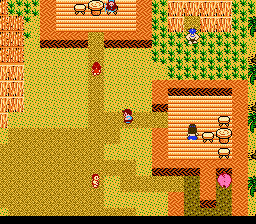
Startropics (Europe)
Startropics (Europe): NES Action
Startropics (Europe) is an action-adventure game developed by Nintendo for the Nintendo Entertainment System. Released in Europe in 1990, this title is known for its unique blend of puzzle-solving and action elements. It was part of a wave of innovative games during the NES era, showcasing the capabilities of the platform and the creativity of its developers.
In Startropics, players take on the role of Mike Jones, who embarks on a quest to rescue his uncle from mysterious forces. The gameplay combines exploration, combat, and puzzle-solving, requiring players to navigate through various islands, interact with characters, and defeat enemies. Players utilize a slingshot and other items to tackle obstacles, solve environmental puzzles, and progress through the game’s story.
What makes Startropics worth trying today is its nostalgic charm and engaging gameplay. While it may not be as widely recognized as some of its contemporaries, it offers a refreshing experience that stands apart from typical action-adventure titles of the time. The game is notable for its quirky charm, unique mechanics, and a fun narrative that adds depth to the gameplay, making it a hidden gem in the NES library that fans of retro gaming should explore.
How to Play Startropics (Europe) Online
Getting started in Startropics involves selecting your game and familiarizing yourself with the controls. Once you begin, you will find yourself on an island where you can explore, talk to villagers, and gather items. The core loop consists of moving through different areas, solving puzzles to unlock new paths, and engaging in battles with various creatures.
As you progress, pay attention to the clues given by NPCs and the environment. Collecting items and using them effectively is crucial for overcoming challenges. The game encourages exploration, so take your time to uncover hidden secrets and enjoy the whimsical world it presents.
Startropics (Europe) Keyboard Controls
Controls
- Arrow Keys — D-Pad / Movement
- X — A button (jump / confirm)
- S — B button (run / attack / cancel)
- Enter — Start / Pause
- V — Select




Comments (0)