Sqoon (Japan)
What is Sqoon (Japan)?
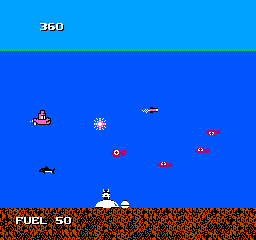
Sqoon is a unique game released for the Nintendo Entertainment System in Japan. Developed by a lesser-known studio, it falls under the action genre and features a distinct underwater theme. This title is not a hack or mod but rather an original release that showcases the creativity of the era's game developers.
In Sqoon, players control a submarine tasked with rescuing stranded sea creatures while battling various underwater enemies. The game incorporates mechanics common to shooters, where players navigate through levels, dodging obstacles and attacking foes. The controls are straightforward, and the objective revolves around survival and exploration in a vibrant underwater world.
For retro gaming enthusiasts, Sqoon offers a nostalgic glimpse into the creativity of NES titles. While it may not be as widely known as other classics, it has its own charm and can be a fun experience for those interested in exploring lesser-known gems. Its unique setting and gameplay mechanics provide a refreshing contrast to many more popular titles of the time, making it worth a try for collectors and fans alike.
How to Play Sqoon (Japan) Online
To get started with Sqoon, begin by selecting your game mode from the main menu, which is in Japanese. Once you’re in, you’ll find yourself piloting a submarine in a quest to rescue sea creatures while engaging in combat against various enemies. The core loop involves navigating through levels, collecting items, and avoiding hazards, all while managing your resources effectively.
As you progress, familiarize yourself with the controls and the mechanics of your submarine, such as shooting and maneuvering. Understanding the layout of each level and the types of enemies you encounter will be crucial for success. Keep an eye on the health of your submarine and the creatures you need to save, as these elements are central to your mission.
Sqoon (Japan) Keyboard Controls
Controls
- Arrow Keys — D-Pad / Movement
- X — A button (jump / confirm)
- S — B button (run / attack / cancel)
- Enter — Start / Pause
- V — Select





Comments (0)