The game loads when you press Play · press “Play Now” inside the game if it asks.
Son Son (Japan)
Son Son
Inside Son Son
- Nintendo Entertainment System
- Platformer
- 5· 0 votes
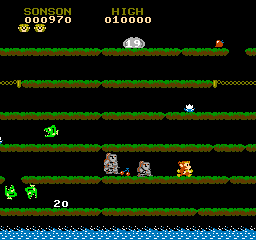
Son Son is an action game released for the Nintendo Entertainment System, exclusively in Japan. The game is a port of the arcade title developed by Capcom, which originally launched in 1983. As a classic platformer, it showcases the unique gameplay mechanics and visual style of its era, featuring a colorful world filled with various enemies and obstacles.
In Son Son, players take on the role of a monkey who must navigate through levels filled with enemies and challenges. The core mechanics revolve around jumping, attacking, and collecting items while progressing through stages. Players will encounter a variety of foes and must use their abilities strategically to overcome them, making it a game that requires both skill and timing.
Although it may not be as well-known as other titles from the NES library, Son Son offers a nostalgic experience for fans of retro platformers. Its unique premise and engaging gameplay provide a charming glimpse into the gaming culture of the 1980s. While it may not compete with heavyweights like Super Mario or Mega Man, it is worth exploring for those looking to discover lesser-known gems from the era.
GAME INFO
- Platform
- Nintendo Entertainment System
- Genre
- Platformer
- Released
- 1986
- Players
- 1
- Region
- Japan
More Son Son Games
Ready for another round? Explore more Son Son games and console editions. Choose a game below to play it on its own page.
How to play Son Son online
Getting started in Son Son involves selecting your game mode from the main menu, which is in Japanese, so some familiarity with the language or navigation through the options is helpful. Once you're in the game, your primary goal is to traverse through various levels filled with enemies and obstacles. Collect items to boost your abilities and defeat foes using your character's attacks.
The gameplay loop focuses on platforming and combat, where you jump between platforms, avoid enemy attacks, and defeat enemies to progress. Pay attention to item pickups, as they can enhance your performance. The game encourages exploration, so take your time to uncover secrets and maximize your score.
CONTROLS
Controls
- Arrow Keys — D-Pad / Movement
- X — A button (jump / confirm)
- S — B button (run / attack / cancel)
- Enter — Start / Pause
- V — Select
Son Son FAQ
Who developed Son Son?
The development of Son Son was handled by Capcom, a well-known company in the gaming industry recognized for many classic titles.
Is Son Son exclusive to Nintendo Entertainment System or did it appear on other systems?
Son Son was primarily released for the Nintendo Entertainment System in Japan and did not see official releases on other platforms.
Roughly how long does it take to finish Son Son?
The time to complete Son Son can vary based on player skill, but it typically takes around 1-2 hours to finish the game.
You may also like
All Nintendo Entertainment System games











GAME INFO
- Platform
- Nintendo Entertainment System
- Genre
- Platformer
- Released
- 1986
- Players
- 1
- Region
- Japan
COMMENTS (0)
No comments yet. Be the first to share your thoughts.