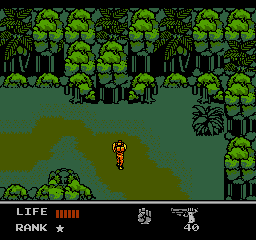
Snake's Revenge (Europe)
Snake's Revenge (Europe) - Action Classic
Snake's Revenge (Europe) is an action game released on the Nintendo Entertainment System (NES). This title is a sequel to the original Snake game, known for its stealth elements and tactical gameplay. While the exact developer is not widely documented, the game was published in Europe, and it carries the legacy of the classic franchise that began on earlier platforms.
In Snake's Revenge, players take on the role of a soldier tasked with completing various missions. The gameplay revolves around stealth mechanics, where players must navigate through enemy territory while avoiding detection. Utilizing a variety of weapons and gadgets, players engage in combat and complete objectives to progress through the game.
This title holds a unique position within the NES library, appealing to fans of stealth and action games. While it may not be as well-known as other major titles of its era, such as Metal Gear, it still offers a solid gameplay experience for those interested in tactical action. Its blend of stealth and action makes it worth trying for players looking to explore lesser-known gems of the NES catalog.
How to Play Snake's Revenge (Europe) Online
To get started with Snake's Revenge, you'll first want to familiarize yourself with the controls. Movement is handled via the arrow keys, allowing you to navigate through the game’s environments. You'll begin by selecting a mission from the menu, which will set the stage for your objectives.
As you play, focus on stealth and strategy. Each mission requires you to outsmart enemies rather than confront them head-on. Utilize the weapons and gadgets at your disposal to complete objectives while remaining undetected. Understanding enemy patterns and the layout of each level is crucial for success, so take your time to explore and plan your approach.
Snake's Revenge (Europe) Keyboard Controls
Controls
- Arrow Keys — D-Pad / Movement
- X — A button (jump / confirm)
- S — B button (run / attack / cancel)
- Enter — Start / Pause
- V — Select




Comments (0)