The game loads when you press Play · press “Play Now” inside the game if it asks.
Sanrio Carnival (Japan)
Sanrio Carnival
What is Sanrio Carnival?
- Nintendo Entertainment System
- Action
- 5· 0 votes
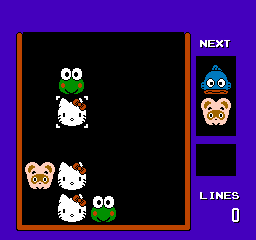
Sanrio Carnival is a Japan-exclusive title for the Nintendo Entertainment System, released in the early 1990s. The game features characters from the Sanrio franchise, which is known for its cute and whimsical designs. While not widely documented, it is part of the action genre and reflects the playful spirit of other titles from that era.
In this game, players engage in various mini-games that revolve around the Sanrio characters. The gameplay typically involves completing tasks that require skill and timing, often reflecting the arcade-style mechanics popular during the NES era. Players may need to navigate through different levels or challenges, all while interacting with familiar faces from the Sanrio universe.
Today, Sanrio Carnival stands as a nostalgic piece of gaming history, especially for fans of the Sanrio brand. While it may not offer the depth or complexity of more prominent titles, its charm lies in its simplicity and the appeal of its characters. It's a great pick for collectors or those looking to explore lesser-known gems from the NES library, particularly if they enjoy light-hearted, casual gaming experiences.
GAME INFO
- Platform
- Nintendo Entertainment System
- Genre
- Action
- Players
- 1
- Region
- Japan
More Sanrio Carnival Games
Ready for another round? Explore more Sanrio Carnival games and console editions. Choose a game below to play it on its own page.

How to play Sanrio Carnival online
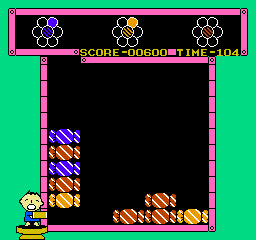
Getting started in Sanrio Carnival involves navigating through the main menu, which is presented in Japanese. Players will likely want to select the first option to begin the game. The core gameplay loop consists of engaging in various mini-games, each with its own unique challenges and objectives that require different skills.
As you play, focus on mastering the controls and understanding the mechanics of each mini-game you encounter. Timing and precision will be key to progressing through the challenges. Since the menus are in Japanese, it may help to familiarize yourself with common phrases or icons to navigate more efficiently.
CONTROLS
Controls
- Arrow Keys — D-Pad / Movement
- X — A button (jump / confirm)
- S — B button (run / attack / cancel)
- Enter — Start / Pause
- V — Select
Sanrio Carnival FAQ
Who developed Sanrio Carnival?
The developer of Sanrio Carnival is not widely documented, so specific details about the team behind the game are unclear.
Does Sanrio Carnival have a multiplayer or co-op mode?
The game does not feature multiplayer or co-op modes; it is designed for single-player experiences.
Is Sanrio Carnival exclusive to Nintendo Entertainment System or did it appear on other systems?
Sanrio Carnival is exclusive to the Nintendo Entertainment System and has not been released on other platforms.
You may also like
All Nintendo Entertainment System games











GAME INFO
- Platform
- Nintendo Entertainment System
- Genre
- Action
- Players
- 1
- Region
- Japan
COMMENTS (0)
No comments yet. Be the first to share your thoughts.