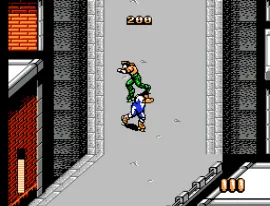
Rollergames (Europe)
What is Rollergames (Europe)?
Rollergames (Europe) is a sports-themed action game released for the Nintendo Entertainment System. It is based on a television show of the same name and was published in Europe during the 1990s. The game features roller derby elements, combining racing and combat in a unique way that reflects the era's interest in sports and competitive gameplay.
In Rollergames, players take control of a character who competes in a roller derby-style race. The gameplay involves navigating through various tracks while avoiding obstacles and engaging in combat with opponents. Players can perform jumps and attacks to gain an advantage, and the game is structured around progressing through different levels, each with its own challenges and enemies.
This title is worth a look for retro gaming enthusiasts and fans of sports games. While it may not have the same recognition as other NES classics, it offers a fun blend of racing and fighting mechanics that can be quite enjoyable. Its niche appeal lies in its unique theme, and it serves as an interesting example of how the NES library diversified during its lifespan with various genres and concepts.
How to Play Rollergames (Europe) Online
Getting started in Rollergames involves selecting your character and choosing a game mode. Once in the game, players will navigate through various tracks while trying to outmaneuver their opponents. The core loop revolves around racing, jumping, and engaging in combat, making it essential to master both movement and attack mechanics to succeed in the game.
As you progress, pay attention to the layout of each level, as they feature different obstacles and enemy types. Learning the timing for jumps and attacks is crucial for maintaining speed and avoiding hazards. Collecting power-ups can also provide advantages, so keep an eye out as you race through the game.
Rollergames (Europe) Keyboard Controls
Controls
- Arrow Keys — D-Pad / Movement
- X — A button (jump / confirm)
- S — B button (run / attack / cancel)
- Enter — Start / Pause
- V — Select




Comments (0)