Road Fighter (Japan)
Road Fighter (Japan): NES Action
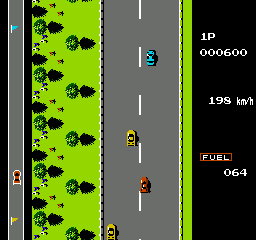
Road Fighter is a racing game released exclusively in Japan for the Nintendo Entertainment System. Developed by Konami, this title emerged during the early days of the NES in the late 1980s, reflecting the genre conventions of that era. Players take control of a car, navigating through various tracks while avoiding obstacles and competing against other racers.
Gameplay involves maneuvering your vehicle through a series of increasingly challenging courses. The objective is to reach the finish line within a set time limit while managing fuel levels and avoiding collisions with other cars and obstacles on the road. Players must utilize their reflexes and timing to succeed in this fast-paced environment, which is characteristic of many arcade-style racing games from the period.
Today, Road Fighter may not be as well-known as some of its contemporaries, but it holds a certain charm for retro enthusiasts. Its straightforward mechanics and nostalgic graphics make it a fun title to revisit, especially for those interested in the evolution of racing games. While it may not offer the depth of more modern titles, its simplicity and addictive gameplay provide a unique experience that reflects an important era in gaming history.
How to Play Road Fighter (Japan) Online
To get started with Road Fighter, begin by selecting your desired game mode from the main menu, which is presented in Japanese. Familiarize yourself with the controls, as they are essential for navigating the tracks successfully. The core loop of the game involves racing against opponents while managing your fuel and avoiding crashes.
As you play, focus on mastering the timing of your turns and acceleration. It's important to keep an eye on the fuel gauge, as running out can cost you valuable time. While the menus are in Japanese, basic navigation can be achieved with trial and error, and there are plenty of resources available online to help you understand the game better.
Road Fighter (Japan) Keyboard Controls
Controls
- Arrow Keys — D-Pad / Movement
- X — A button (jump / confirm)
- S — B button (run / attack / cancel)
- Enter — Start / Pause
- V — Select




Comments (0)