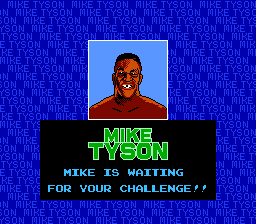
Mike Tyson's Punch-Out!! (Europe)
Getting to Know Mike Tyson's Punch-Out!! (Europe)
Mike Tyson's Punch-Out!! (Europe) is a boxing video game developed by Nintendo for the Nintendo Entertainment System. Released in the late 1980s, this title became a staple of the fighting genre on the NES. It features an iconic roster of characters and is known for its unique gameplay style, which combines strategy and reflexes rather than just button mashing.
In the game, players take on the role of Little Mac, a young boxer aiming to become the champion. The gameplay revolves around facing various opponents in the ring, each with their own distinctive fighting style and patterns. Players must learn to dodge, block, and counterattack, utilizing timing and strategy to defeat each challenger and progress through the ranks.
What makes Mike Tyson's Punch-Out!! worth revisiting today is its blend of challenging gameplay and memorable characters. While it may not have the depth of modern boxing simulators, its arcade-style mechanics and colorful graphics capture the spirit of the era. Many players appreciate the nostalgic charm and the satisfying feeling of mastering each opponent's patterns, making it a fun experience for both new and veteran gamers alike.
How to Play Mike Tyson's Punch-Out!! (Europe) Online
Getting started with Mike Tyson's Punch-Out!! involves selecting your character and diving into the boxing matches. Players will face a series of opponents, each requiring different strategies to defeat. The core loop consists of learning the patterns of each opponent, timing your attacks, and using defensive maneuvers effectively to avoid getting knocked out.
As you progress, focus on mastering the timing of punches and dodges. Each opponent has unique tells that indicate their next move, so pay close attention to their patterns. The game rewards patience and skill, as you learn to exploit openings and counterattack at the right moment to emerge victorious in the ring.
Mike Tyson's Punch-Out!! (Europe) Keyboard Controls
Controls
- Arrow Keys — D-Pad / Movement
- X — A button (jump / confirm)
- S — B button (run / attack / cancel)
- Enter — Start / Pause
- V — Select
Comments (0)