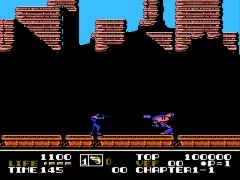
Low G Man - The Low Gravity Man (Europe)
Low G Man - The Low Gravity Man (Europe) on NES
Low G Man - The Low Gravity Man is an action platformer developed for the Nintendo Entertainment System. Released in Europe, this title features unique low-gravity mechanics that set it apart from other games of its time. While the specific developer is not widely documented, it captures the essence of 8-bit gaming with its colorful graphics and engaging gameplay.
In the game, players take on the role of Low G Man, navigating through various levels filled with obstacles and enemies. The hallmark of gameplay is the low-gravity mechanic, which allows players to jump higher and float for longer periods compared to traditional platformers. Each level presents challenges that require precise timing and strategic movement, making it a test of skill and reflexes.
Despite being lesser-known, Low G Man offers a distinctive experience that can appeal to retro enthusiasts. The game's unique mechanics resonate well with fans of platformers from the NES era, especially those who enjoy experimenting with movement physics. Although it may not be as widely recognized as iconic titles, it holds a niche appeal for players looking to explore the diverse library of the NES.
How to Play Low G Man - The Low Gravity Man (Europe) Online
Getting started with Low G Man involves selecting your game mode and diving into the action. Players will begin in the first level, learning to navigate the low-gravity environment. As you progress, familiarize yourself with the jumping and floating mechanics, which are key to overcoming obstacles and defeating enemies.
The core loop revolves around exploring levels, collecting power-ups, and defeating enemies while mastering the unique physics of the game. Pay attention to your surroundings, as some areas may contain hidden paths or items that can aid your journey. Learning the timing of your jumps and attacks can make a significant difference in your success.
Low G Man - The Low Gravity Man (Europe) Keyboard Controls
Controls
- Arrow Keys — D-Pad / Movement
- X — A button (jump / confirm)
- S — B button (run / attack / cancel)
- Enter — Start / Pause
- V — Select





Comments (0)