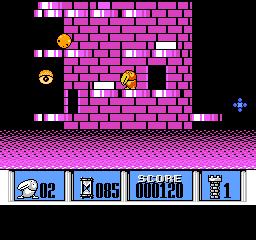
Kyoro Chan Land (Japan)
Kyoro Chan Land (Japan) Overview
Kyoro Chan Land is a platformer game released exclusively in Japan for the Nintendo Entertainment System. Developed by the company known for creating engaging titles, this game was part of the colorful and imaginative era of 8-bit gaming in the late 1980s. It embodies the charm and simplicity typical of many Japanese releases during this time, focusing on straightforward gameplay mechanics and vibrant visuals.
In Kyoro Chan Land, players control a character navigating through various levels filled with obstacles and enemies. The gameplay revolves around jumping and running, which are common mechanics in platformers of the NES era. Players will encounter different challenges as they progress, often requiring quick reflexes and strategic thinking to overcome enemies and obstacles.
This title is worth trying for those who appreciate classic platformers, especially from the NES library. While it may not be as well-known as other iconic titles, it offers a nostalgic experience reminiscent of simpler gaming days. Kyoro Chan Land may appeal to collectors or retro gaming enthusiasts looking to explore lesser-known gems from Japan's rich gaming history.
How to Play Kyoro Chan Land (Japan) Online
Getting started in Kyoro Chan Land involves selecting the game from the main menu, which is in Japanese. Players will begin by controlling their character through various levels filled with challenges. The core loop consists of navigating through these levels while avoiding or defeating enemies and collecting items to progress.
As you play, focus on timing your jumps and utilizing the run mechanics effectively to navigate tricky sections. Familiarize yourself with the layout of each level, as memorizing enemy placements and obstacles will help improve your performance. Since the game is in Japanese, take note of any symbols or patterns that might assist in understanding the gameplay mechanics better.
Kyoro Chan Land (Japan) Keyboard Controls
Controls
- Arrow Keys — D-Pad / Movement
- X — A button (jump / confirm)
- S — B button (run / attack / cancel)
- Enter — Start / Pause
- V — Select





Comments (0)