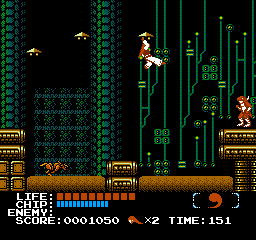
Jigoku Gokuraku Maru (Japan)
Jigoku Gokuraku Maru (Japan): NES Action
Jigoku Gokuraku Maru is a Japanese exclusive title for the Nintendo Entertainment System, released in the early 1990s. This game is classified as an action platformer, where players navigate through various levels filled with enemies and obstacles. Developed by an unknown team, it provides a glimpse into the creative landscape of Japanese gaming during this era.
In the game, players control a character that must traverse through different stages, defeating enemies and collecting items. The gameplay focuses on platforming mechanics, requiring precise jumps and timing to overcome challenges. Each level presents unique designs and enemy types, encouraging players to develop strategies for progression and survival.
This title is a niche gem within the NES library, appealing to those who appreciate lesser-known Japanese releases. It offers a straightforward yet engaging gameplay experience, reminiscent of other action platformers of its time. While it may not have the widespread recognition of titles like Super Mario Bros, it provides a unique experience for collectors and retro gaming enthusiasts looking to explore the depths of the NES catalog.
How to Play Jigoku Gokuraku Maru (Japan) Online
Getting started in Jigoku Gokuraku Maru involves familiarizing yourself with the basic controls and the layout of the game. Upon entering the game, you'll find the menus are in Japanese, so it may take some time to navigate through them. Start by selecting your preferred mode, and prepare for platforming challenges and enemy encounters.
As you play, your primary goal is to reach the end of each level while defeating enemies and collecting power-ups. Pay attention to the enemy patterns and the layout of platforms, as this will help you avoid taking damage. The core loop revolves around mastering jumps and attacks to progress through increasingly difficult stages, making it essential to practice and refine your skills.
Jigoku Gokuraku Maru (Japan) Keyboard Controls
Controls
- Arrow Keys — D-Pad / Movement
- X — A button (jump / confirm)
- S — B button (run / attack / cancel)
- Enter — Start / Pause
- V — Select




Comments (0)