Hudson Hawk (Japan)
Hudson Hawk (Japan): NES Platformer
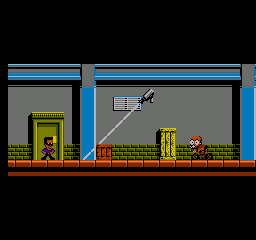
Hudson Hawk is a platform game released for the Nintendo Entertainment System in Japan. It is based on the 1991 film of the same name, developed by an unknown studio. The game is notable for being a licensed title that incorporates elements from the movie, although details surrounding its development are not widely documented.
In the game, players take control of the titular character, Hudson Hawk, navigating through various levels that require both jumping and running mechanics. The core gameplay revolves around completing objectives while avoiding enemies and obstacles. Players will encounter different items and power-ups throughout their journey, which can aid in progressing through the stages. The controls are reminiscent of other platformers of the era, offering a straightforward approach to gameplay.
What makes Hudson Hawk worth a look today is its unique connection to the film, offering a nostalgic experience for those familiar with the movie. While it may not be as polished as other platformers on the NES, it holds a certain charm for collectors and fans of retro gaming. Players seeking to explore lesser-known titles will find this game a curious addition to their library, despite its niche appeal.
How to Play Hudson Hawk (Japan) Online
Getting started with Hudson Hawk involves selecting the game from the main menu, which is in Japanese. You'll begin your adventure by controlling Hudson as he navigates through various levels. The core loop consists of jumping over obstacles, defeating enemies, and collecting items to aid in your quest.
As you play, be mindful of your surroundings and the enemies you encounter. Timing your jumps and attacks is crucial for progressing through the levels. While the game may present challenges, it follows a familiar platforming structure, making it accessible for players familiar with the genre.
Hudson Hawk (Japan) Keyboard Controls
Controls
- Arrow Keys — D-Pad / Movement
- X — A button (jump / confirm)
- S — B button (run / attack / cancel)
- Enter — Start / Pause
- V — Select





Comments (0)