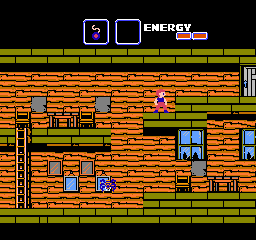
Goonies II, The (Europe)
About Goonies II, The (Europe)
Goonies II, The (Europe) is a classic action-adventure game released for the Nintendo Entertainment System (NES). Developed by Konami, this title is a sequel to the original Goonies game and was released in Europe in 1987. The game follows the adventures of the Goonies as they navigate a variety of environments to rescue their friends while facing numerous foes along the way.
In Goonies II, players take control of a character navigating through a labyrinthine world filled with puzzles and enemies. The gameplay combines platforming mechanics with exploration, requiring players to find keys and items to progress through levels. Players can interact with various characters and objects, enhancing the game's depth and encouraging exploration as they uncover secrets and hidden areas.
This title is worth trying today for its nostalgic value and as a representative of its genre during the late 80s. While it may not be as revered as some other NES titles, it offers a unique blend of action and puzzle-solving that was quite common for its time. Fans of retro gaming will appreciate its charm and the challenge it presents, making it a solid addition to any NES library.
How to Play Goonies II, The (Europe) Online
Getting Started: To begin playing Goonies II, start by selecting your character and getting familiar with the controls. The game opens in a central hub area, allowing you to explore and choose which level to tackle first. As you venture through the game, you'll encounter various puzzles and enemies that require your attention.
The core loop involves exploring different rooms, defeating enemies, and collecting items that help you progress. Pay attention to the environment; some areas may require specific items to access, so exploring thoroughly is crucial. Interacting with characters and solving puzzles will unlock new paths and advance the story, ensuring a rewarding experience as you uncover more of the game.
Goonies II, The (Europe) Keyboard Controls
Controls
- Arrow Keys — D-Pad / Movement
- X — A button (jump / confirm)
- S — B button (run / attack / cancel)
- Enter — Start / Pause
- V — Select




Comments (0)