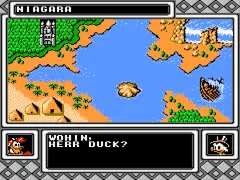
Duck Tales 2 (Germany)
What is Duck Tales 2 (Germany)?
Duck Tales 2 (Germany) is a platformer game released for the Nintendo Entertainment System, developed by Capcom. This title is a sequel to the original Duck Tales and was localized for the German market. As with many games of the era, it combines elements of action and adventure, drawing inspiration from the popular Disney franchise featuring Scrooge McDuck and his nephews.
In Duck Tales 2, players take control of Scrooge McDuck as he embarks on a treasure-hunting quest across various locations. The gameplay is characterized by exploration, platforming, and combat, where players can utilize Scrooge's cane to attack enemies and navigate through levels. Collecting treasures and solving puzzles are key components, as players must gather items to advance and unlock new areas.
This game is worth trying today for its nostalgic value and charming graphics, which capture the essence of the Disney universe. While it may not be as widely recognized as other classics, Duck Tales 2 offers a delightful experience reminiscent of the platforming genre's golden age. It appeals to both fans of retro games and those who appreciate well-crafted titles from the late 80s and early 90s, making it a fun addition to any retro gaming library.
How to Play Duck Tales 2 (Germany) Online
Getting started in Duck Tales 2 involves selecting your game mode and diving into the first level. Players will control Scrooge McDuck as he explores various environments, collecting treasures and defeating enemies using his cane. The core loop revolves around navigating platforms, solving puzzles, and gathering items that help unlock further stages.
As you progress, it's essential to familiarize yourself with the mechanics, such as using your cane to bounce and attack. Each level has its own unique challenges and treasures, so keeping an eye out for hidden items can be beneficial. Collecting treasures not only adds to your score but also contributes to your overall success in the game.
Duck Tales 2 (Germany) Keyboard Controls
Controls
- Arrow Keys — D-Pad / Movement
- X — A button (jump / confirm)
- S — B button (run / attack / cancel)
- Enter — Start / Pause
- V — Select





Comments (0)