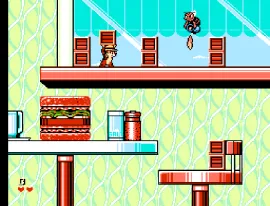
Chip 'n Dale Rescue Rangers 2 (Europe)
Getting to Know Chip 'n Dale Rescue Rangers 2 (Europe)
Chip 'n Dale Rescue Rangers 2 is a platform game released for the Nintendo Entertainment System in Europe. Developed by Capcom, this title is a sequel to the original game based on the popular animated series featuring the titular chipmunks. The game retains its classic platforming roots, making it a noteworthy entry in the NES library.
In this game, players control Chip and Dale as they navigate through various levels filled with obstacles and enemies. The core mechanics revolve around platforming, where players can jump, run, and throw objects to defeat foes or solve puzzles. Collecting items and power-ups enhances the gameplay experience, allowing players to tackle challenges with different strategies.
What makes Chip 'n Dale Rescue Rangers 2 worth a try today is its nostalgic charm and engaging gameplay that appeals to both newcomers and retro enthusiasts. While it may not be as groundbreaking as some other titles of its era, it offers a solid platforming experience with cooperative multiplayer options. Fans of platformers and those who enjoyed the original will find this sequel a delightful addition to their collection.
How to Play Chip 'n Dale Rescue Rangers 2 (Europe) Online
Getting started in Chip 'n Dale Rescue Rangers 2 involves selecting your character and diving into the first level. As you progress, the gameplay loop consists of navigating through levels, defeating enemies, and collecting items to advance. Pay attention to the environment, as many levels contain secrets and hidden pathways that can yield useful power-ups.
To succeed, players should familiarize themselves with the mechanics of throwing objects and utilizing cooperative gameplay if playing with a friend. Teamwork can make certain sections easier, as players can combine efforts to overcome obstacles and defeat tougher enemies. The game encourages exploration, so take your time to discover all it has to offer.
Chip 'n Dale Rescue Rangers 2 (Europe) Keyboard Controls
Controls
- Arrow Keys — D-Pad / Movement
- X — A button (jump / confirm)
- S — B button (run / attack / cancel)
- Enter — Start / Pause
- V — Select





Comments (0)