Biomotor Unitron (Japan)
About Biomotor Unitron (Japan)
Biomotor Unitron is a role-playing video game developed by Yumekobo and published by SNK for the Neo Geo Pocket Color. It launched in Japan and North America in 1999, making it the first RPG on the system, arriving just a few weeks after the console's debut. This Japanese version is functionally identical to the North American release but naturally displays all menus and text in Japanese.
How to Play Biomotor Unitron (Japan) Online
Getting Started
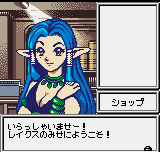
When you start Biomotor Unitron, you will be greeted by a title screen in Japanese. Press Start to proceed to the main menu, then use the D-Pad to highlight the first option (New Game) and press X to confirm. The game begins in a small town where you can talk to NPCs, buy equipment, and prepare for adventure.
The core gameplay loop involves traveling between towns and dungeons, engaging in turn-based battles with random encounters. As you defeat monsters, your character gains experience points and levels up, increasing stats. You can equip weapons, armor, and items purchased in shops. Save your progress at designated save points, which appear as glowing circles on the ground in towns.
Because the Japanese version uses all Japanese text, navigating menus may be challenging if you don't read the language. However, the menu structure is standard for RPGs of the era: the first menu option is usually "Start", followed by "Continue" or "Load". In battle, the default action is Attack, and you can select it with the A button. Experiment cautiously - your adventure will unfold naturally as you explore.
Biomotor Unitron (Japan) Keyboard Controls
Controls
- Arrow Keys: D-Pad / Movement
- X: A button
- S: B button
- Z: Y button
- A: X button
- Q: L shoulder
- E: R shoulder
- Enter: Start
- V: Select

Comments (0)