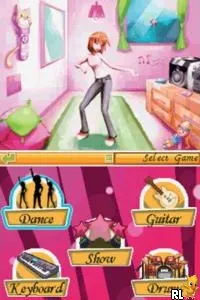
Music Star - I Wanna Be a Popstar (Europe) (En,Fr,De,Es,It,Nl)
About Music Star - I Wanna Be a Popstar (Europe) (En,Fr,De,Es,It,Nl)
Music Star - I Wanna Be a Popstar is a music simulation game released for the Nintendo DS, specifically in Europe. The exact release year isn't widely documented, but it is known to support multiple languages, including English, French, German, Spanish, Italian, and Dutch. This title falls under the music genre, appealing to players who enjoy rhythm-based gameplay and the music industry theme.
In this game, players take on the role of aspiring pop stars, engaging in various rhythm-based challenges to build their careers. The gameplay typically involves performing songs, managing a music career, and competing in talent shows. Players can customize their characters, choose outfits, and even select songs to perform, creating a unique experience tailored to their preferences.
Today, Music Star - I Wanna Be a Popstar holds a niche position within the DS library. While it may not be as iconic as other titles in the genre, it offers a lighthearted take on the music simulation experience. Fans of rhythm games or those looking for a casual gaming experience might find it enjoyable, especially given the era's focus on music and performance-themed games.
How to Play Music Star - I Wanna Be a Popstar (Europe) (En,Fr,De,Es,It,Nl) Online
To get started in Music Star - I Wanna Be a Popstar, players should begin by creating their character and customizing their appearance. Once your pop star is ready, the core gameplay loop revolves around performing songs and participating in events. Engaging in rhythm challenges will help you progress and build your music career.
As you play, it's important to pay attention to the timing and rhythm of the songs. Success in performances translates to increased popularity and unlocks new opportunities. Keep an eye out for different songs and challenges that can enhance your pop star's journey.
Music Star - I Wanna Be a Popstar (Europe) (En,Fr,De,Es,It,Nl) Keyboard Controls
Controls
- Arrow Keys — D-Pad / Movement
- X — A button
- S — B button
- Z — Y button
- A — X button
- Q — L shoulder
- E — R shoulder
- Enter — Start
- V — Select
Comments (0)